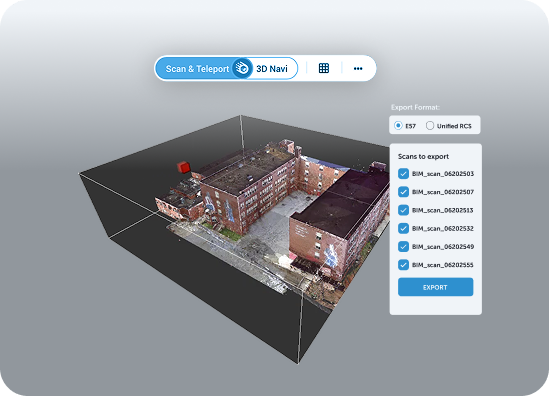
Every scan-to-BIM deliverable looks great. The delivered dataset loads instantly, the model loads into place, and the measurement lands right on the edge of the beam. Then your as-built data goes in: 400 scans from three survey campaigns, a federated mesh and that’s when you find out what you actually bought.
This guide gives contractors, design/build teams and owners a practical way to evaluate scan-to-BIM software and services, built around the two questions that decide most use cases: will it be trustworthy, and will my model meet requirements?
Will it actually be accurate, and will my model line up?
Those are the right questions, and no vendor can answer them for you in a slide deck. Accuracy depends on your as-built data, and more importantly the technicians interpretation. Alignment depends on your coordinate systems, your registration quality and how your models were set up. The only honest answer comes from testing the results on the laser scanner data, your own scans and your own interpreatation
It helps to be specific about what each question really means on a project.
The level of detail required. It's how long it takes to get registered scans published, how quickly a coordinator can open and move through a large site, how responsive Revit stays when the point cloud is linked, and how many days pass before a trade partner sees the data. A platform can be quick at one of these and slow at the rest.
"Lines up" isn't a yes or no. It means the scans and the model share the same origin and orientation, measurements hold within the tolerance your project agreed, and that alignment survives when the data moves back into Revit or Navisworks. If any one of those breaks, your team ends up checking everything twice.
The rest of this guide turns both questions into tests you can run in a two-to-four-week pilot.
Scan-to-BIM software vs scan-to-BIM services: what are you actually buying?
A scan-to-BIM service delivers a finished model built by a provider’s modelers. Scan-to-BIM software lets your own team register scans and build the model. A visualization and control tool doesn’t create models: it shows the registered scans next to the delivered model so you can check one against the other.
| |
Scan-to-BIM service |
Modeling and registration software |
Visualization and control tool
|
| What you get |
A finished as-built model, delivered by a provider |
Desktop tools to register scans and build the model in-house |
A shared view of the registered scans next to the delivered model |
| Who builds the model |
The provider's modelers |
Your in-house team |
Nobody. It doesn't author models |
What it's good at
|
Capacity when you don't have modelers |
Full control if you have the skills in-house |
Checking that the model matches reality, and sharing both with the project |
What it doesn't do
|
Show you how the scans were interpreted |
Make the data easy to share outside the BIM team |
Register scans or create geometry |
Key question to ask
|
How will I check what I receive? |
Who on my team will use it, and how often? |
Can it show me where the model and the scan disagree? |
Most contractors and owners outsource the modeling at least some of the time. That's where the two questions in this article really come from. Whether the delivered model is faithful to the site is much harder to see, and it's the one that costs money later.
The real risk: you can't see how your scans were interpreted
A scan-to-BIM model is never a direct copy of the point cloud. Someone sits in front of millions of points and decides what they are. Is that a 150 mm pipe or a 200 mm one? Is the slab level or does it fall toward the drain? Is that grey shape a valve worth modeling, or noise worth ignoring?
Every one of those calls is an interpretation. When you outsource the work, you don't choose who makes them, how experienced they are, or how motivated they are to chase the details on a fixed-price job. Two modelers can work from the same scan and hand you two different models. Both will look clean in Revit.
That's why "will my model line up?" is the right question. A model that looks clean but simplifies a congested ceiling void, misses a beam or places a riser 60 mm off just moves the problem to site, where it shows up as a clash, a prefab spool that doesn't fit, or a change order.
The usual control is a visual spot check and a lot of trust. The better control is to keep the registered scan next to the delivered model, so you can check the modeler's interpretation after delivery, before anyone designs or fabricates against it. Our article on scan-to-BIM services covers what to expect from the provider side.
LOD, LOI and accuracy: define "lines up" before anyone models
You can't check a model against a vague brief. If the contract says "as-built model of Level 2," every interpretation is technically correct. Before you choose a provider or a tool, write down three things.
| Spec |
What it defines |
Example in a brief |
| Level of detail (LOD) |
How much geometry gets modeled, and how precisely it's shaped |
MEP mains and branches down to 50 mm, with valves and dampers as families |
| Level of information (LOI) |
Which data each element carries |
System, size, material, and tag or asset ID for equipment |
| Accuracy and tolerance |
How close the model has to be to the scan |
System, size, material, and tag or asset ID for equipment |
LOD and LOI work together. A duct modeled at the right size but with no system data fails the LOI. A pump with perfect data but placed 200 mm off fails on accuracy. Both get through a quick visual review.
Two practical tips. First, set different tolerances by discipline: what's fine for a partition wall isn't fine for a connection a prefab module will bolt to. Second, list the areas where interpretation is hardest, such as congested ceiling voids, plant rooms and risers, and tell the provider those will be checked first.
Alignment matters too. The scans and the model need to share the same coordinate system before any comparison means anything, so agree on survey control or a shared reference frame with your survey team up front. Cintoo's scan and model alignment guidance walks through the options.
What to look for in a tool to control model quality
If you're evaluating software to control model quality, these are the criteria that matter. What you need is to see the site clearly and compare it honestly with what was delivered.
- Fidelity of the scan data. Can you see the scan at full resolution, close enough to read a valve, a flange or a cable tray? If the data gets thinned out to display it, you're checking the model against a simplified version of reality.
- Model and scan in one view. You should be able to load the delivered model (RVT, IFC, NWD, DWG and so on) and the registered scans (E57, RCP, LAS, LAZ) together, in the same coordinate system, without rebuilding anything.
- Measurement on the scan itself. Checking a dimension shouldn't mean asking the modeler. Your team should be able to measure directly in the scan data.
- Findings that stay attached to the data. Annotations and issues should sit at the exact location in the scan, visible to the person who has to fix them, and be easy to hand off to your coordination tools.
- Access for everyone who needs to review. The provider, the design team, the owner's rep and the site team should all see the same scan and model, in a browser, with access limited to the right areas.
- Clear limits. Ask exactly what the tool checks automatically and what still depends on human review. A vendor that's honest about this is easier to trust on everything else.
- Security. Ask for certifications such as ISO/IEC 27001 and SOC 2 Type 2, GDPR compliance and the data hosting location. Owners and public clients will ask you the same questions.
The best test is still a pilot. Take a model you've already received, ideally one that caused a problem on site, load it next to its scans and see how quickly the issue becomes visible.
How to check a delivered scan-to-BIM model in Cintoo
Once the model arrives, the goal is to answer one question: does it faithfully represent what was scanned, at the LOD and LOI you asked for? Cintoo is the QA/QC layer between the scan and the model. It doesn't author models or register scans; it lets you compare the delivered BIM or CAD model with the registered scans, measure, and document what doesn't match. Among Cintoo clients, the review runs as a loop, whether the model comes from an in-house team, a design office or a subcontractor:
- Upload and confirm alignment. Load the delivered model alongside the registered scans, the as-built data, and check a few fixed features such as columns, slab edges and floor levels. If those don't match, stop there: every other check depends on it.
- Compare, area by area. Run Cintoo's comparison tool to check the model's geometric precision against the scans, organizing the review in Work Zones and starting with the zones you flagged as hardest to interpret. Look for elements that sit off the scanned surface, are oversimplified or are missing, and measure critical dimensions such as pipe diameters, clearances and tie-in points directly in the scan data.
- Check and annotate. Record each discrepancy as an annotation at its exact 3D location, with its severity, a description and a screen grab. Spot-check the LOI on a sample of elements too: is that tagged pump the one on site, and is the duct the size its attributes say?
- Assign and export. Assign each annotation and export the findings as a BCF file or PDF report, so the modelers can go straight to each area of concern. See how Cintoo fits into BIM coordination.
- Fix, re-upload and recheck. The modelers correct the model and upload the new version to Cintoo. Re-run the comparison on the same areas and sign off only when every finding is closed or formally accepted. Only then is the model released for design, fabrication or operations.
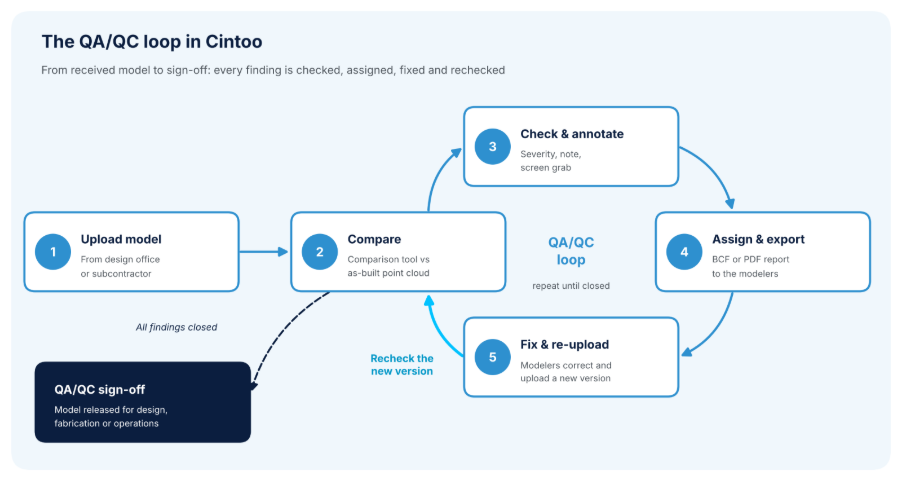
The QA/QC loop in Cintoo: each finding is annotated, assigned, fixed and rechecked on the new model version until the model is signed off.
This is also where you learn how good your provider really is. After two or three projects, you'll know which ones chase the details and which ones don't.
Throughout the loop, reviewers check against the actual site, not a thinned-out version: Cintoo preserves high-resolution reality capture and streams it in a browser, and the provider, designers, site team and owner all review the same data with role-based access. Cintoo is certified to ISO/IEC 27001:2022 and SOC 2 Type 2, and complies with GDPR. On site, the same platform also supports 3D scan progress monitoring of BIM elements against new scans.
A word on expectations: Cintoo measures how far the model sits from the scan, but it doesn't sign the model off for you. Results depend on the quality and registration of the source scans and the model. What it gives you is the evidence to judge for yourself. The full list is on the Cintoo feature list, and for a project example, read how Hensel Phelps planned, built and managed a large construction project with Cintoo.
FAQ about Scan-to-BIM Software
Should I outsource scan-to-BIM or model in-house?
It depends on how often you scan and whether you have modelers. Outsourcing gives you capacity. Modeling in-house gives you control. If you outsource, plan how you'll check the delivered model against the scans before you need it.
What's the difference between LOD and LOI?
LOD (level of detail) defines how much geometry is modeled and how precisely. LOI (level of information) defines what data each element carries, such as system, size or asset tag. A good brief specifies both, plus a tolerance.
Why doesn't my delivered model match the point cloud?
Usually it's one of three things: the model and scans aren't in the same coordinate system, the brief left too much room for interpretation, or the modeler simplified hard-to-read areas. Check alignment first, then review the congested zones.
Can software automatically check a model's LOD and LOI?
Partly. Geometric deviation, yes: Cintoo's comparison tool shows where model elements depart from the scan. Whether the model meets the LOD and LOI in the brief still needs an experienced reviewer, and with Cintoo that reviewer can control the delivered model against the scan before it goes into production.
Is Cintoo scan-to-BIM software?
No. Cintoo doesn't create models or register scans. It's a cloud platform to visualize and compare delivered models against registered scan data, and share the fi