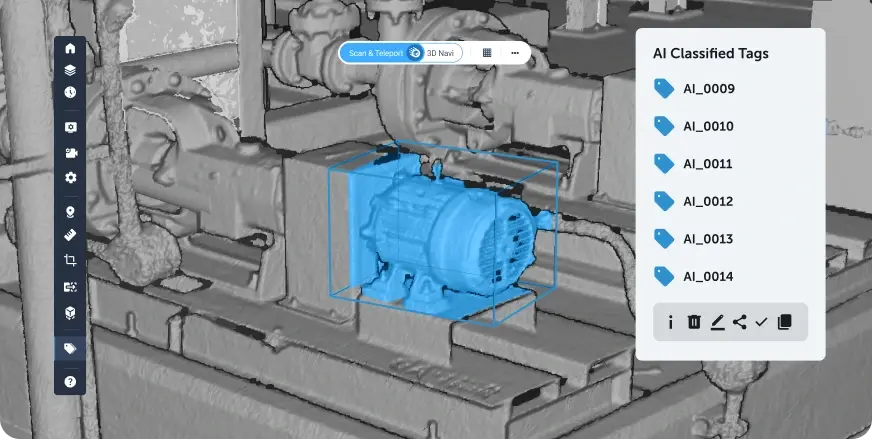
Ask where the truth about a single pump lives, and you'll get a list of different sources. The CMMS holds its maintenance history. The ERP knows its spare parts. The P&ID shows how it connects to the process. A laser scan shows what's actually installed. The rest sits in an engineer's head.
Each source is right about something. None of them agree on everything.
Asset contextualization is how you close that gap without replacing the systems your teams already depend on. In this article, you'll learn what it means, why asset information stays fragmented, and how connecting P&IDs, 3D scans and engineering data gives everyone one view of the facility as it really is.
Why is our asset information still fragmented across systems?
Asset information is fragmented because every system was bought to do one job well, and none was designed to describe the whole asset. Maintenance, finance, engineering and survey teams each own a piece. Nothing ties those pieces to the physical object on site.
If you own asset information, you'll recognize the pattern:
- Systems of record don't share a language. Your CMMS or EAM tracks work orders. Your ERP tracks cost and spares. Your document management system stores P&IDs and drawings. Each one names and structures assets its own way.
- Documents drift from reality. Brownfield sites carry decades of revisions. A valve gets rerouted during a shutdown, and the P&ID update waits for a project that never gets funded.
- Reality capture stays with the specialists. Laser scans are heavy files that need desktop software to open. So the most accurate record of your facility often sits on a few hard drives, out of reach for the people who'd use it most.
- Field knowledge walks out the door. Experienced operators know where things really are. When they retire or move on, that knowledge goes with them.
The cost shows up every day. Engineers travel to site just to confirm what's installed. Planners build turnaround scopes on drawings they don't fully trust. Contractors arrive with the wrong measurements. Every one of these is a decision made without the full picture, and that's where avoidable risk and rework come from.
What is asset contextualization?
Asset contextualization is the practice of linking everything you know about a physical asset (its tag, its P&ID symbol, its documents, its maintenance records and its as-built 3D geometry) through a shared identifier and a real location. Anyone can then move from one source to another and see the asset where it actually stands.
It isn't another database, and it isn't a data migration. Your CMMS stays your CMMS. Contextualization adds the relationships between sources, plus the spatial layer that shows where each asset is and what surrounds it.
A contextualized asset answers three questions in one place:
- What is it? Tag ID, equipment class, manufacturer, maintenance history.
- Where is it? Its exact position, size and access route in the facility as captured today.
- How does it connect? Its place in the process, upstream and downstream, as shown on the P&ID.
P&IDs, scans and engineering data: what each layer tells you
Each layer is useful on its own, but only answers part of the question. Contextualization works because the three layers fill each other's gaps.
| Layer |
What it tells you |
What it can't tell you alone |
| P&IDs |
Process logic: how lines, valves and instruments connect, and their design intent |
Where the equipment physically sits, or whether the field still matches the drawing |
| 3D reality capture (laser scans, 360° imagery) |
What's installed today, at full resolution, with real dimensions and surroundings |
What an object is, what it does in the process, or its maintenance status |
| Engineering and operational data (asset registers, CMMS/EAM, ERP) |
Identity, specifications, history, work orders, spares |
Location, physical condition, or context on site |
The tag is the glue
The link between layers is usually a tag ID, the equipment label your organization already uses (for example, P-101A). When the same ID appears on the P&ID symbol, in the asset register and on the object in the 3D scan, all three records point to the same physical thing.
That sounds simple. In practice, it's where most digital twin initiatives stall: tags are inconsistent across systems, P&IDs are scanned PDFs, and nobody has placed the tags on the as-built geometry. Fixing that is the real work of contextualization.
What changes in practice: a turnaround planning example
Picture a maintenance planner scoping the replacement of a control valve ahead of a turnaround.
Without contextualization, the planner opens the P&ID as a PDF and finds the valve tag. They search the CMMS for its history and check which drawing revision is current. Then they ask: does the valve still sit where the isometric says it does? Is there room for a crane, or will they need scaffolding? Nobody can say for certain, so someone books a site visit. On a remote or offshore asset, that one trip can cost more than the valve.
With contextualization, the workflow looks like this:
- The planner clicks the valve symbol on the P&ID.
- The view jumps to the valve in the 3D scan of the unit as it stands today.
- They check clearances, access routes and nearby equipment, and take measurements directly in the scan.
- The tag's metadata links straight to the CMMS record and the open work orders.
- They share a link with the contractor, who sees exactly the same context.
Same people, same systems of record. The difference is that the information is connected to the real asset, so the decision gets made at a desk instead of on a ladder. [ADD: a customer figure for site visits avoided, once validated]
How Cintoo supports asset contextualization
Cintoo Twin Edition gives you the visual and spatial layer that connects your existing systems of record to the physical facility. It doesn't replace your CMMS, EAM or ERP. It shows where their data lives in the real world.
Start from reality, at full resolution
Cintoo turns heavy laser scan data into lightweight, high-resolution 3D meshes that stream in any web browser. Operations, engineering and maintenance teams can open the same as-built view without specialist desktop software, alongside BIM models and 360° imagery.
Tag every asset, your way
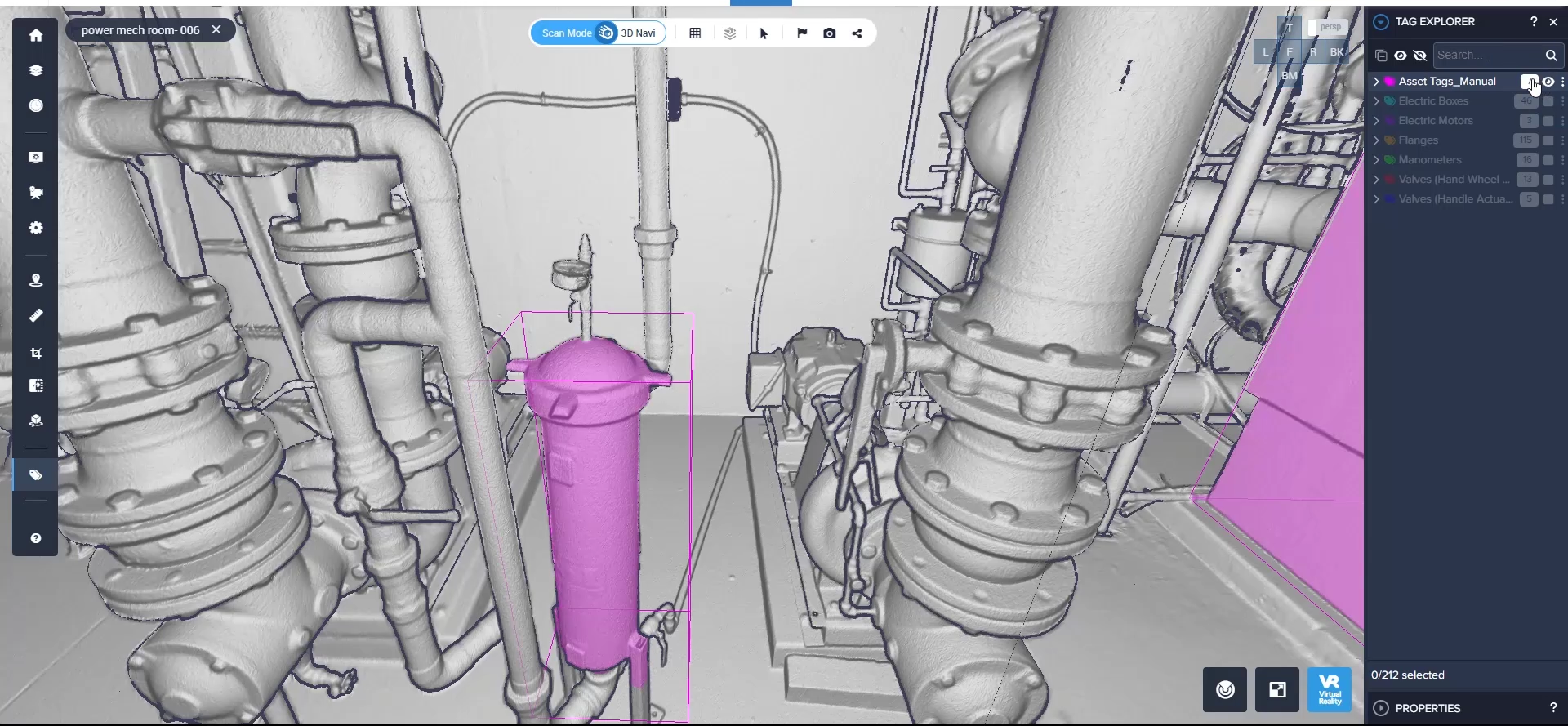
Twin Edition offers unlimited asset tagging built on an open tag data model you can shape to your own standards. You can create tags in four ways:
- Click & Tag: select an asset in the 3D scene and assign its ID and metadata, using one or several bounding boxes for complex equipment.
- From models: generate tags from BIM or model elements with the Model Content Explorer.
- AI detection: let Cintoo AI detect and classify assets in the scan data, then review and validate the proposals.
- Import your register: bring in an existing asset list from CSV or Excel to create tags in bulk, or update them through the Cintoo API.
Tags can carry custom metadata, including hyperlinks to your ERP, EAM or digital twin platform, so a click on an asset takes you straight to its record.
Bring P&IDs into the twin
With P&ID Explorer and P&ID Viewer, you upload P&IDs as PDFs and work with them in a split screen next to the 3D view. You mark instruments and pipes on the diagram as 2D tags, then link them to the matching 3D tags. Page links keep lines continuous across multi-page P&IDs.
Once linked, navigation works in both directions. Select an asset in 3D and the P&ID highlights its symbol. Double-click a symbol and the 3D view focuses on the asset.
Connect to the systems you already run
Contextualized data is only useful if it flows back into daily work. Twin Edition connects with platforms such as Cognite Data Fusion, Esri ArcGIS and Power BI, and the Cintoo API lets you sync tags with other systems.
The result is one shared, visual context for the facility: actionable, because everyone works from the same hub, and clarified, because every decision is checked against the asset as it really is.
Where to start: a practical path for asset information owners
You don't need to contextualize a whole site on day one. The teams that get value fastest start small, prove it, then scale.
- Pick one high-stakes area. A unit heading into a turnaround, a retrofit, or an inspection program gives you a clear deadline and a clear payoff.
- Agree on your tag convention and your masters. Decide which ID format you'll use, and which system owns what: the 3D context, the maintenance data, the master data.
- Capture or reuse current scans. Recent laser scans or 360° imagery [ADD LINK: 360 Edition page] of the area become your as-built reference.
- Import the register you already have. Bulk-load tags from your asset list, then fill gaps with AI detection or manual tagging.
- Link the P&IDs that matter most. Start with critical instruments and lines, not every symbol on every sheet.
- Connect back to your systems of record. Use metadata links or the Cintoo API so people reach the CMMS or ERP record from the asset itself.
- Measure what changed. Track site visits avoided, time spent finding information, and rework caught before it happened.
A useful test before you begin: how often does your designated source of truth differ from what's physically installed? If nobody can answer with confidence, you've found your first use case.
FAQ: What Is Asset Contextualization?
Is asset contextualization the same as a digital twin?
No. A digital twin is the overall representation of a facility. Asset contextualization is what makes it useful: it links the twin's 3D geometry to the identity, documents and history of each asset. A twin without context is a nice picture. A contextualized twin supports real decisions.
Do we need to replace our CMMS, EAM or ERP?
No. Contextualization connects existing systems of record rather than replacing them. In Cintoo, tags hold the 3D location and geometry of each asset, while your CMMS, EAM or ERP keeps the data it already manages. Metadata links and the API connect the two.
What data do we need to get started?
Three things cover most first projects: recent scan data of the area, your P&IDs as PDF files, and an existing asset register in CSV or Excel. Missing tags can be added with AI detection or manual tagging (see how tags work in Cintoo).
Can P&ID symbols be linked to 3D assets automatically?
In Cintoo today, AI helps detect and classify assets in scan data, and users link P&ID symbols to their 3D tags. Once a link exists, navigation between the diagram and the 3D view works in both directions. [TO VERIFY: wording with product team before publication]
Which Cintoo edition includes P&IDs and asset tagging?
P&ID functionality and unlimited asset tagging are part of Twin Edition, built for asset and facility management during operations. BIM Edition focuses on construction-phase workflows such as scan-to-BIM and progress tracking.



.png?width=48&height=48&name=sensors%20(1).png)
.png?width=65&height=50&name=sensors%20(2).png)


.png?width=69&height=50&name=cloud_done%20(1).png)


.png?width=42&height=49&name=Group%2015496%20(2).png)


.png?width=60&height=60&name=calendar%20(1).png)


.png?width=48&height=45&name=image%20175%20(1).png)