Your team just completed an extensive 3D scanning campaign. The data is captured, registered, and sitting on a server. So why does the digital twin project feel like it stalled before it even started?
This is one of the most common and frustrating challenges facing BIM managers, VDC leads, facility managers, and digital innovation teams today. The scanning phase generates excitement and visible progress. But what happens next often determines whether that investment turns into operational value or becomes another expensive archive.
This guide walks you through the full journey from 3D mesh data to a scalable digital twin workflow. You'll learn why projects stall, where the gaps hide, and how to build a system that keeps momentum through BIM, validation, collaboration, and long-term operational use.
Key Takeaways: How to Keep Digital Twin Projects Moving After Scans
- Digital twin projects often stall because organizations lack a clear plan for what happens after 3D scanning is complete.
- Siloed data and disconnected teams create bottlenecks that prevent scan data from reaching stakeholders who need it.
- Converting 3D mesh data into structured, intelligent models requires dedicated workflows for scan-to-BIM processes.
- Cintoo helps teams move faster by converting 3D scan data into lightweight, accessible 3D meshes anyone can use.
- Successful digital twins require ongoing governance, validation, and integration with operational systems over the asset lifecycle.
Why Do Digital Twin Projects Stall After Scanning?
Scanning feels like the hard part. Teams invest in equipment, plan logistics, coordinate access, and capture millions of data points. When the scanning phase ends, there's often a false sense of completion.
The reality is different. A 3D mesh or point cloud is raw geometry. It lacks the semantic structure, metadata, and system connections that make a digital twin useful. Without a clear path forward, this data often sits untouched while teams move on to other priorities.
Several patterns contribute to this stall. First, many organizations start scanning without defining specific operational outcomes. Second, the technical skills required to process and model 3D scan data are different from those needed to capture it. Third, large datasets create storage and accessibility challenges that slow collaboration.
The Gap Between Capture and Application
The gap between capture and application is where most digital twin initiatives lose momentum. Scanning generates data, but operational intelligence requires structured information connected to business systems.
Think of it this way: a 3D scan tells you what physically exists. A digital twin tells you what it means, who owns it, when it was installed, how it's performing, and what might fail next. Closing this gap requires deliberate workflow design.
How to Define Clear Outcomes Before You Start
The most successful digital twin projects begin with specific, measurable goals. Before launching a scanning campaign, answer these questions: What decisions will this twin support? Which teams will use it? What systems need to connect to it?
Vague objectives like "create a digital twin" or "digitize the facility" lead to vague results. Specific goals like "reduce HVAC maintenance response time by 30%" or "identify clash detection issues before prefabrication" give teams something to design around.
Common Operational Outcomes for Industrial Digital Twins
Here are outcomes that typically justify digital twin investments in industrial and AECO environments:
- Brownfield engineering support: Planning retrofits, expansions, or modifications with accurate as-built geometry.
- Design validation: Comparing design models against as-built conditions to identify deviations early.
- Asset management: Tracking equipment locations, conditions, and maintenance histories spatially.
- Remote collaboration: Reducing site visits by giving dispersed teams access to facility conditions.
- Safety planning: Simulating emergency scenarios and validating access routes using accurate 3D geometry.
When you define outcomes before scanning, you can plan your capture strategy, processing workflow, and modeling depth to match.
What Are the Common Failure Points in Post-Scan Workflows?
Understanding where digital twin projects break down helps you design workflows that avoid those traps. Based on industry patterns, five failure points appear repeatedly.
1. No Clear Ownership After Scanning
Scanning projects often have dedicated teams or contractors. Once the data is delivered, ownership becomes unclear. Who processes it? Who models it? Who maintains it? Without answers, the data drifts.
2. Data Stays Siloed in Specialized Software
Large 3D datasets require specialized hardware and software to view and manipulate. When only a few specialists can access the data, it never reaches the broader teams who could use it for maintenance, planning, or operations.
3. Modeling Bottlenecks Slow Everything Down
Scan-to-BIM conversion is labor-intensive. Converting 3D geometry into intelligent objects with attributes takes time and expertise. When modeling capacity can't keep pace with scanning output, backlogs grow.
4. Quality Issues Surface Too Late
Data quality problems discovered during modeling or operations force teams backward. Missing coverage, registration errors, or insufficient detail create delays and rework.
5. No Connection to Operational Systems
A 3D model that doesn't connect to maintenance, asset management, or enterprise systems has limited value. Integration requires planning and technical work that often gets deprioritized.
How to Build a Scalable Scan-to-BIM Workflow
A scalable workflow moves 3D scan data through processing, modeling, validation, and deployment without creating bottlenecks. The key is building repeatable processes with clear handoffs.
Step 1: Plan Your Scan Strategy Around Downstream Use
Scanning decisions should reflect how the data will be used. This includes:
- Level of detail: Higher resolution scans support detailed modeling but increase processing time and storage needs.
- Coverage requirements: Identify critical areas that need full coverage versus areas where lower detail suffices.
- Coordinate system: Establish a consistent coordinate system that aligns with existing documentation and models.
Step 2: Register and Clean Your Data Systematically
Raw scans from multiple stations need registration to create a unified dataset. Use target-based or cloud-to-cloud registration methods with documented quality checks. Clean the data by removing noise, transient objects, and outliers before moving to modeling.
Step 3: Convert Point Clouds to Usable Formats
Point clouds are dense but lack structure. Converting them to high-fidelity 3D meshes makes the data more accessible and easier to stream. Cintoo's TurboMesh technology converts complex point cloud datasets into lightweight, accurate meshes that teams can access through a web browser without specialized hardware.
Step 4: Model Intentionally Based on Your LOD Requirements
Level of Development (LOD) standards define how detailed your BIM models need to be. LOD 100 represents conceptual geometry. LOD 500 represents as-built documentation with verified information. Match your modeling effort to your actual use cases.
Over-modeling wastes resources. Under-modeling creates gaps when you need detail. Define LOD requirements project by project based on operational needs.
Step 5: Validate Models Against Source Data
Modeling errors propagate through downstream workflows. Implement validation checkpoints where models are compared against the original 3D scan data. Look for dimensional accuracy, correct object classification, and complete coverage.
How to Integrate Scan Data with BIM and Design Workflows
Scan data becomes most valuable when integrated with design and planning workflows. This integration lets teams compare as-built conditions against design intent, identify deviations, and make informed decisions.
Overlay BIM Models with As-Built Scans
Overlaying BIM models on top of scan data reveals discrepancies between design and reality. This comparison supports QA/QC processes, clash detection, and design coordination. Teams can identify issues before they become costly rework on site.
Use Deviation Analysis for Quality Control
Deviation analysis quantifies differences between design models and as-built conditions. This is particularly valuable for tracking construction progress, verifying prefabrication fit, and documenting as-built accuracy.
Connect with Existing Design Tools
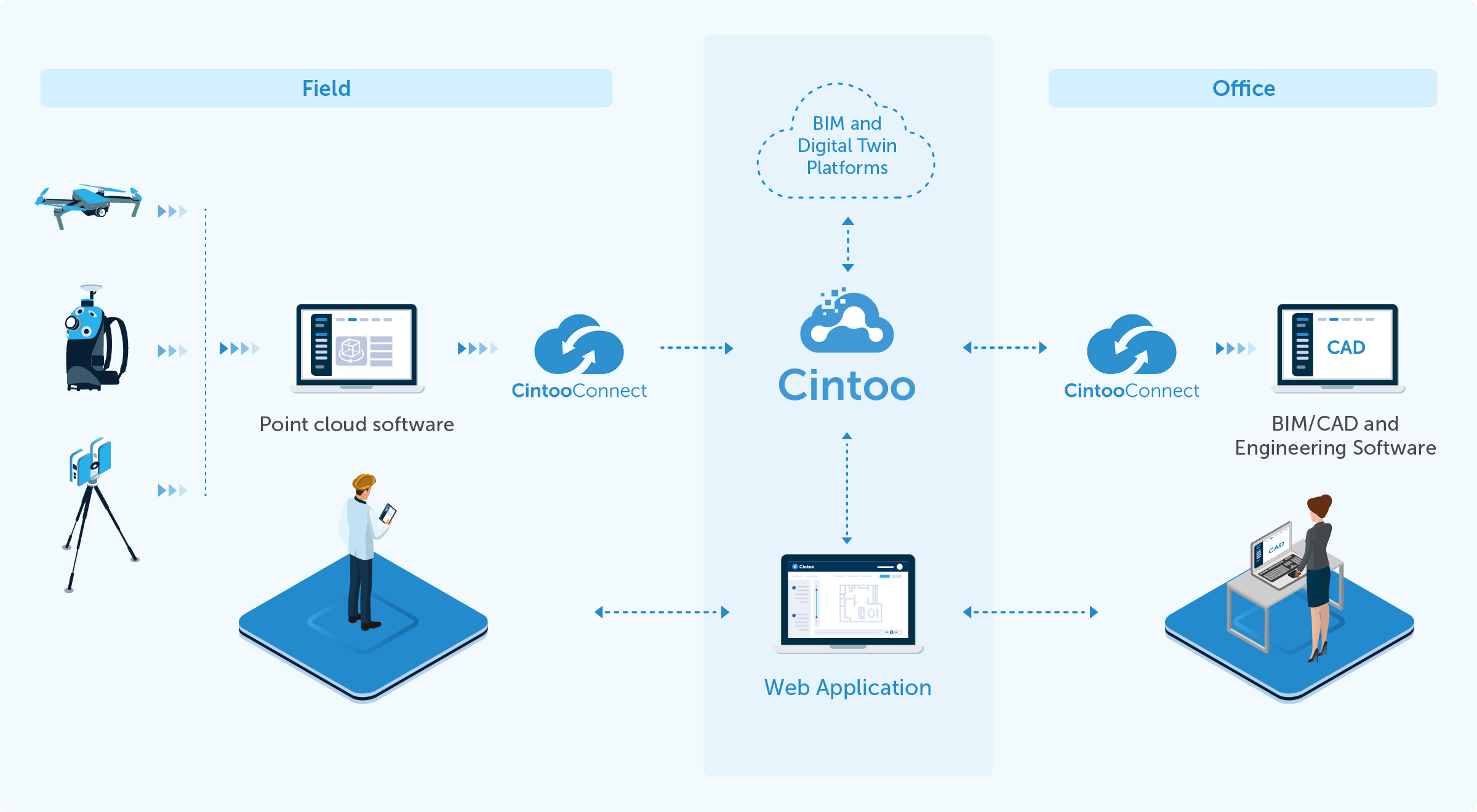
Your teams already use tools like Revit, Navisworks, and AutoCAD. Effective integration means scan data flows into these tools without forcing everyone to learn new software. Cintoo integrates with industry-standard platforms so teams can work in familiar environments while accessing accurate as-built information.
How to Ensure Validation and Quality Control Throughout
Quality problems discovered late in a project create expensive delays. Building validation into your workflow catches issues early when they're easier to fix.
Establish Quality Gates at Each Stage
Define quality gates between scanning, registration, processing, modeling, and deployment. Each gate includes specific checks that must pass before work moves forward:
- Post-scan: Verify coverage, check for gaps, confirm coordinate alignment.
- Post-registration: Review residual errors, check loop closures, validate against survey control.
- Post-processing: Confirm noise removal, verify mesh quality, check file sizes.
- Post-modeling: Compare model geometry to source data, verify object classification, check attribute completeness.
Document Issues and Resolutions
Track quality issues and how they were resolved. This documentation helps teams learn from problems and improve future workflows. It also creates an audit trail for compliance and quality assurance purposes.
How to Enable Cross-Team Collaboration on Digital Twin Data
Digital twins only create value when the right people can access and use them. Breaking down data silos requires deliberate effort.
Make Data Accessible Without Specialized Software
When only specialists with expensive workstations can view 3D data, collaboration suffers. Cloud-based platforms that stream high-fidelity visualization through web browsers remove this barrier. Engineers, operators, and managers can all access the same information without installing specialized software.
Establish Unlimited User Access
Per-seat licensing models limit who can participate. When budget constraints restrict access, knowledge stays siloed. Cintoo's unlimited user model means everyone who needs the data can access it without license negotiations.
Create a Single Source of Truth
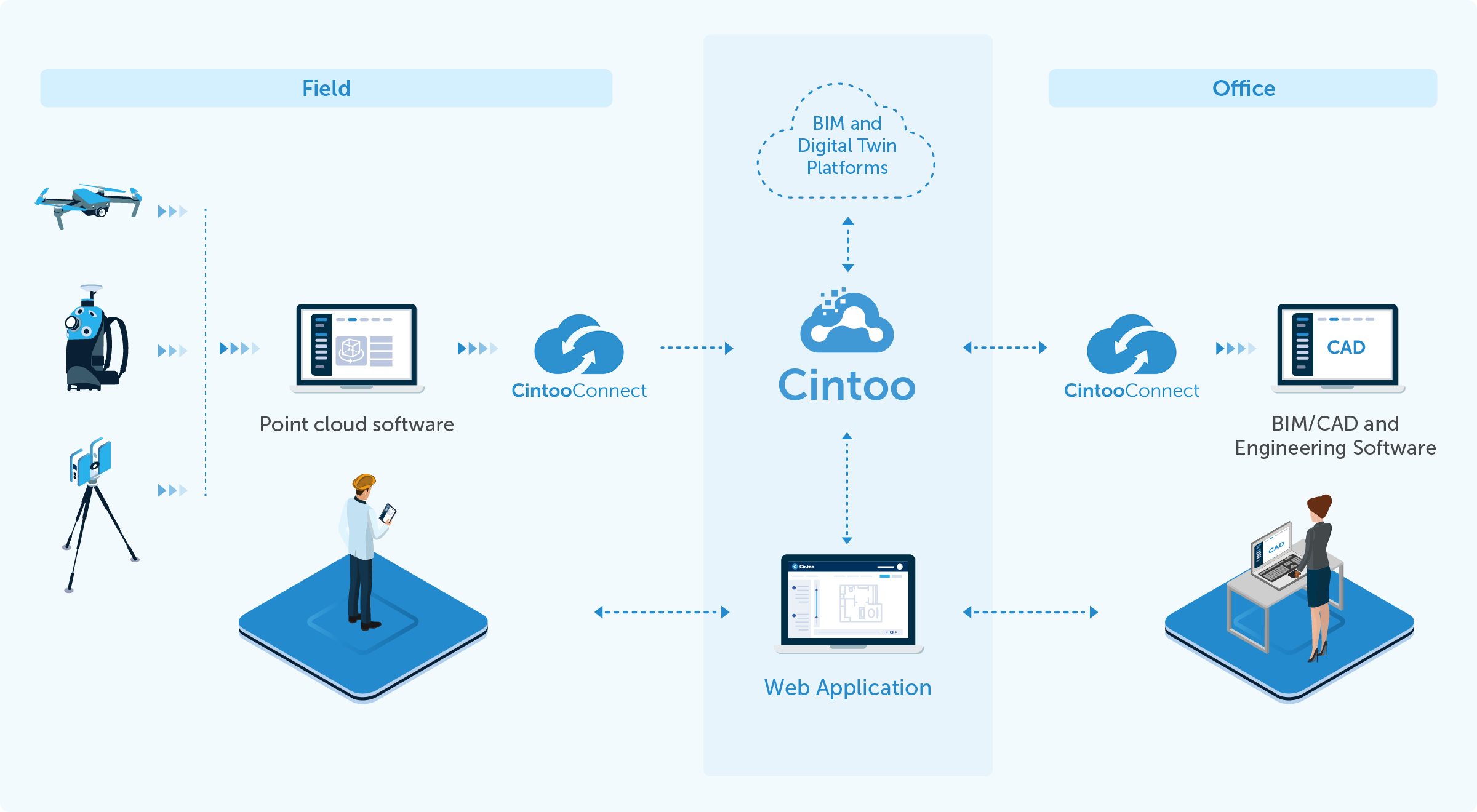
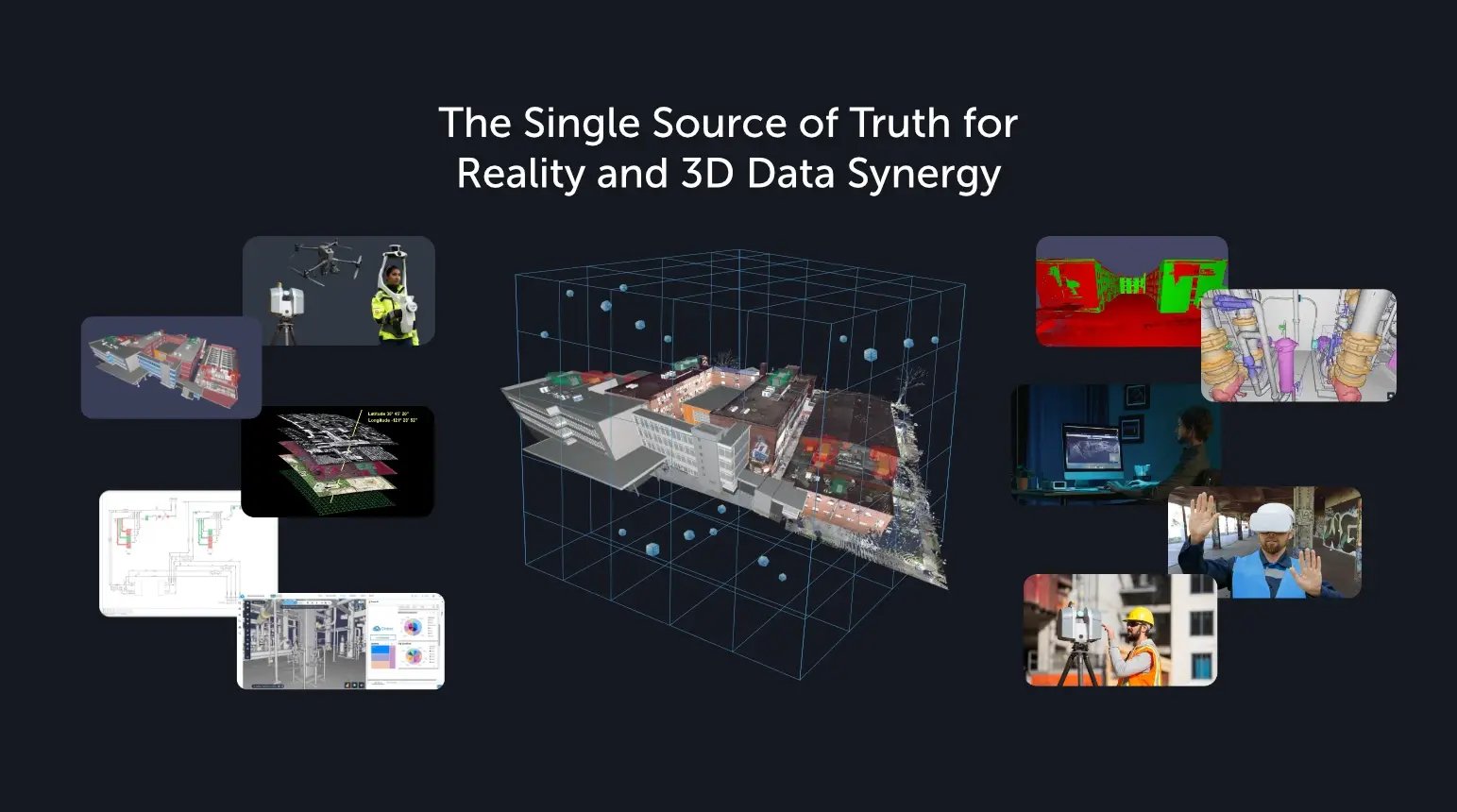
Multiple versions of models and data create confusion and errors. Establish one authoritative source that all teams reference. This single source of truth ensures everyone works from the same information. It is also ideally cloud-based and easily connected to different platforms or systems. Cintoo allows for a single source of truth by connecting all data points and limitless usage.
Support Asynchronous Collaboration
Teams work across time zones and schedules. Tools that support annotations, notes, and issues let people contribute when they're available. These annotations stay attached to specific locations in the 3D environment, making context clear.
How to Connect Digital Twins to Operational Systems
A digital twin reaches its full potential when connected to operational systems. These connections turn static geometry into dynamic operational intelligence.
Link to Asset Management Systems
Connecting your digital twin to asset management platforms (CMMS, EAM) lets you see equipment information in spatial context. Click on a piece of equipment in the 3D environment and access its maintenance history, specifications, and work orders.
Integrate IoT and Sensor Data
Live sensor data displayed in the context of 3D geometry helps operators understand what's happening where. Temperature readings, flow rates, and equipment status make more sense when you can see their physical location.
Connect to Enterprise Systems
ERP, MES, and other enterprise systems contain valuable data that gains context when linked to physical assets. Integration with these systems creates a unified view of operations, maintenance, and performance.
How to Maintain Digital Twins for Long-Term Value
Digital twins require ongoing maintenance to stay useful. Without updates, they become historical records rather than operational tools.
Plan for Regular Updates
Facilities change. Equipment gets replaced, spaces get reconfigured, and conditions evolve. Define a schedule for updating your digital twin based on how quickly your environment changes and how critical current information is.
Capture Changes as They Happen
Rather than waiting for periodic re-scanning campaigns, capture changes as they occur. Lightweight 360 capture tools like Cintoo 360 Edition let teams document modifications without the full cost of precision-based laser scanning.
Establish Governance and Ownership
Assign clear ownership for digital twin maintenance. Someone needs to be responsible for keeping data current, managing access, and ensuring quality. Without ownership, maintenance gets deprioritized.
Version and Archive Systematically
Keep historical versions of your digital twin. These archives let you track changes over time, understand how conditions evolved, and reference previous states when needed.
What Does a Successful Industrial Digital Twin Workflow Look Like?
Successful workflows share common characteristics regardless of industry. They're designed around specific outcomes, built for scalability, and maintained for long-term value.
Characteristics of Effective Digital Twin Programs
- Outcome-driven: Every workflow step serves a defined operational purpose.
- Scalable: Processes handle growing data volumes and expanding scope without breaking.
- Accessible: Data reaches everyone who needs it without technical barriers.
- Integrated: The twin connects to operational systems rather than standing alone.
- Maintained: Regular updates keep information current and accurate.
Building Your Workflow Step by Step
Start small and prove value before expanding. Choose a pilot project with clear outcomes, build your workflow around it, and document what works. Then apply those lessons to larger initiatives.
This incremental approach builds organizational capability while demonstrating return on investment. It's more sustainable than attempting enterprise-wide digital twin deployment from day one.
How to Differentiate Open Workflows from Vendor-Locked Approaches
Not all digital twin platforms work the same way. Some lock you into specific ecosystems. Others support open workflows that integrate with your existing tools and processes.
Why Open Integration Matters
Industrial and AECO organizations already use established tools for design, project management, and operations. A digital twin platform that forces you to abandon those tools creates friction and resistance.
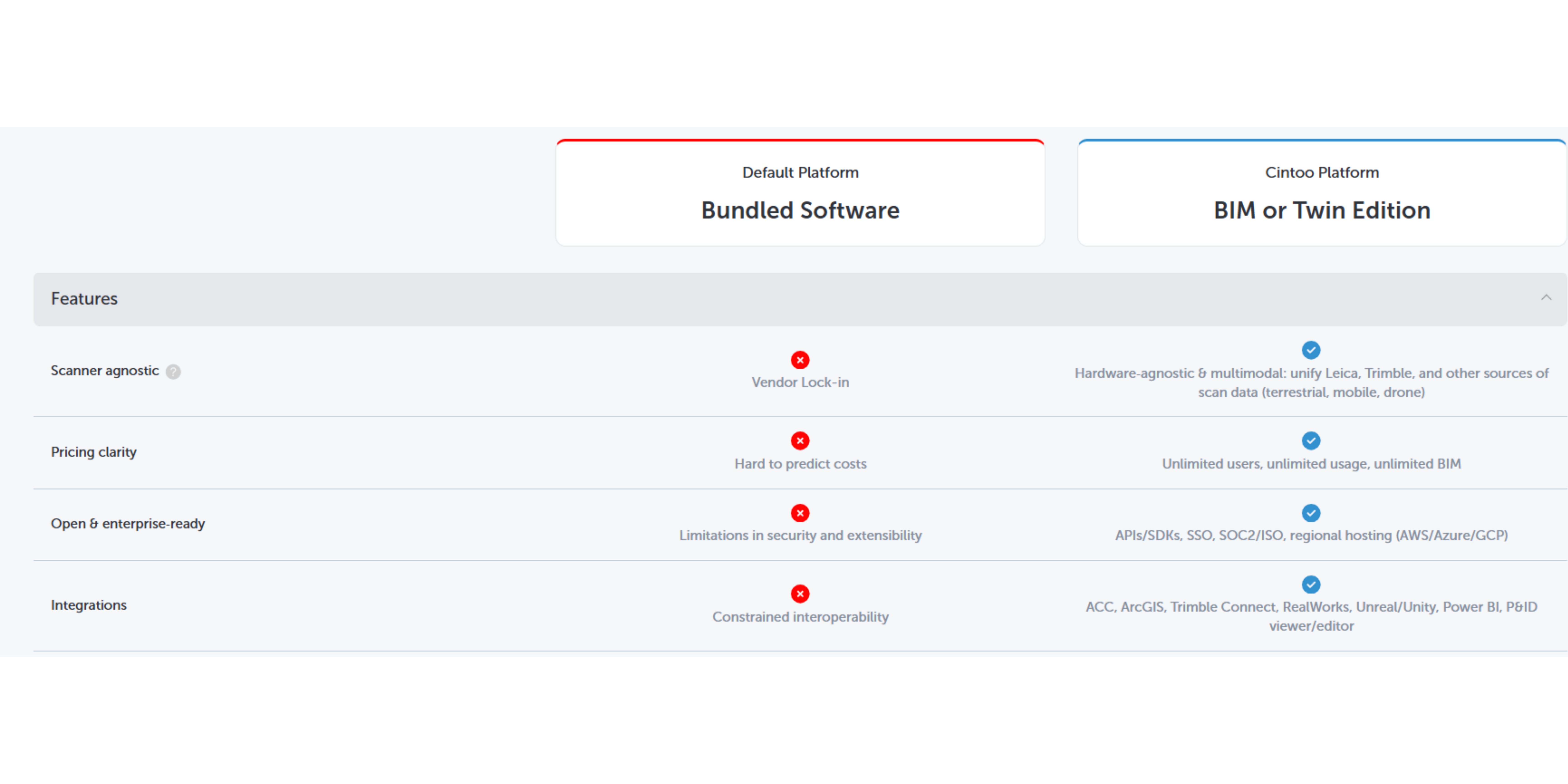
Open integration through SDKs, APIs, and standard file formats lets you connect your digital twin to existing systems. This flexibility reduces adoption barriers and increases long-term value.
Avoiding Vendor Lock-In
Vendor lock-in happens when your data becomes difficult to access outside one platform. Look for platforms that export to standard formats and support interoperability with multiple tools.
Cintoo's agnostic approach supports any laser scanner or reality capture device, enabling flexibility without being locked into a single vendor's ecosystem.
How to Get Started Today
Moving from stalled scan data to a functioning digital twin workflow doesn't require massive upfront investment. It requires clear thinking, realistic planning, and incremental progress.
Assess Your Current State
Audit your existing scan data and documentation. What do you have? Where does it live? Who can access it? What's missing? This assessment reveals your starting point.
Define Your First Operational Outcome
Pick one specific outcome that would create measurable value. Design your pilot workflow around achieving that outcome with existing data or a targeted new scanning campaign.
Build Your Team and Process
Identify who owns each workflow stage. Establish handoffs, quality gates, and documentation standards. Train team members on tools and processes.
Execute, Learn, and Expand
Run your pilot, document results, and capture lessons learned. Use that experience to refine your workflow before expanding to additional use cases or facilities.
In Conclusion: Moving from 3D Scans to Operational Digital Twins
The scanning phase is just the beginning. The real value of a digital twin comes from what happens after capture: processing, modeling, validation, collaboration, integration, and ongoing maintenance.
Projects stall when organizations lack clear outcomes, let data become siloed, or fail to connect their twins to operational systems. They succeed when teams plan deliberately, build scalable workflows, and maintain their digital assets over time.
The path forward requires both technical capability and organizational commitment. Platforms like Cintoo help teams accelerate this journey by making 3D scan data accessible, collaborative, and connected to the systems that matter.
Start with specific outcomes. Build workflows that scale. Maintain your twin over time. That's how you keep digital twin projects moving after scans.
FAQs About How to Keep Digital Twin Projects Moving After Scans
Why do digital twin projects often stall after 3D scanning is complete?
Digital twin projects stall because scanning creates raw geometry, not operational intelligence. Without a clear workflow for processing, modeling, and integration, scan data sits unused while teams lack the skills, tools, or mandate to move forward.
What is the difference between a point cloud and a digital twin?
A point cloud is raw geometric data representing physical surfaces. A digital twin includes structured models, metadata, system connections, and operational logic that make the data useful for decision-making. Cintoo converts point clouds into accessible 3D meshes as a step toward operational digital twins.
How can I make large 3D scan datasets accessible to non-specialists?
Cloud-based platforms that stream high-fidelity 3D data through web browsers eliminate the need for specialized hardware and software. Cintoo's TurboMesh technology makes this possible by converting large datasets into lightweight, streamable formats accessible from any modern browser.
What is Level of Development (LOD) and why does it matter for scan-to-BIM?
Level of Development defines how detailed a BIM model needs to be. LOD ranges from conceptual (LOD 100) to verified as-built (LOD 500). Defining LOD requirements before modeling prevents wasted effort on unnecessary detail or gaps where detail is needed.
How do I prevent data silos in digital twin projects?
Data silos form when only specialists can access 3D data. Combat this by using platforms with unlimited user access, web-based viewing, and integration with existing tools. Cintoo's unlimited user model ensures everyone who needs the data can access it without license restrictions.
What systems should a digital twin connect to for maximum value?
Operational digital twins gain value from connections to asset management (CMMS, EAM), enterprise systems (ERP, MES), IoT sensors, and design tools (BIM, CAD). These connections turn static geometry into dynamic operational intelligence that supports maintenance, planning, and operations.
How often should I update my digital twin to keep it accurate?
Update frequency depends on how quickly your environment changes and how critical current information is. High-change environments may need monthly updates. Stable facilities might update annually. Capture changes as they happen using lightweight tools like Cintoo 360 Edition to reduce re-scanning costs.
Experience Cintoo today and learn more about optimizing your scanning program.



.png?width=48&height=48&name=sensors%20(1).png)
.png?width=65&height=50&name=sensors%20(2).png)


.png?width=69&height=50&name=cloud_done%20(1).png)


.png?width=42&height=49&name=Group%2015496%20(2).png)


.png?width=60&height=60&name=calendar%20(1).png)


.png?width=48&height=45&name=image%20175%20(1).png)