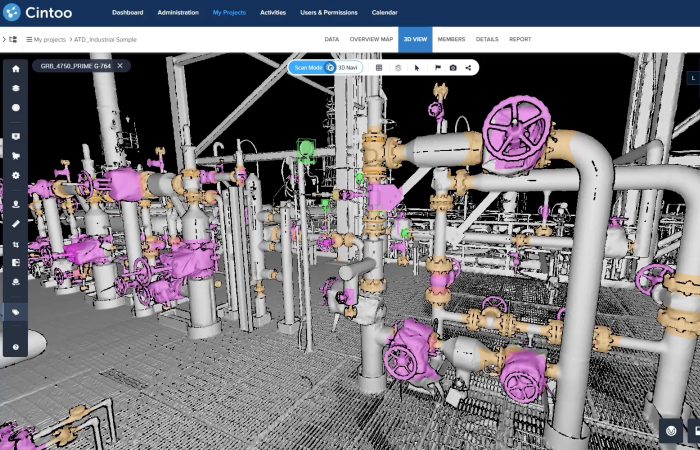
If you manage 3D scan data for industrial facilities, you already know the headaches caused by scattered files, siloed software, and limited access. Asset visualization platforms resolve this by bringing your CAD, BIM, and operational data together in one place where your entire team can access it.
This guide covers everything you need to know about evaluating these platforms for QA/QC and as-built verification in 2026, from core capabilities and integration requirements to scoring frameworks and proof-of-concept strategies.
Key Takeaways: Evaluating Asset Visualization Platforms for 2026
- Asset visualization platforms centralize CAD, BIM, and operational data into a single accessible environment for your entire team.
- Browser-based access removes the need for specialized hardware, enabling remote inspection and real-time collaboration across departments.
- QA/QC and as-built verification workflows depend on high-fidelity, lightweight data, not raw point clouds that limit usability.
- Cintoo delivers scalable cloud-based mesh streaming through its patented TurboMesh technology for industrial QA/QC and as-built verification.
- Open APIs and vendor-agnostic integrations protect your investment against lock-in and support long-term digital twin strategies.
What Is an Asset Visualization Platform?
An asset visualization platform gives your team a centralized digital environment where you can view, navigate, and interact with 3D representations of physical assets. These representations often combine laser scan data, CAD/BIM models, and operational metadata.
Unlike standalone viewers or file-sharing tools, a true platform connects your scan data with enterprise systems like CMMS, ERP, and IoT sensors. This connection turns static 3D models into living references that update as your facility evolves.
For industrial teams responsible for QA/QC and as-built verification, a platform approach means you can compare the design intent against what exists without relying on manual site inspections or disconnected spreadsheets.
Why Industrial Teams Need Dedicated Asset Visualization in 2026
Industrial facilities generate massive quantities of 3D scan data from fixed LiDAR, mobile mapping, and drone surveys. Without a dedicated platform, this data often sits in siloed folders, locked behind specialized desktop software that only a handful of operators can access.
The result: slower decisions, missed deviations, and costly rework. A 2024 study published in MDPI Sustainability found that fragmented BIM and digital twin workflows remain one of the primary barriers to industrial digitalization.
Dedicated asset visualization solves this by converting heavy scan datasets into lightweight, streamable 3D meshes that anyone on your team can open in a browser. You get immediate access to verified, repeatable data without shipping multi-gigabyte files or installing niche software.
Core Capabilities to Evaluate in Any Platform
Data Ingestion and Format Support
Your platform should accept data from any laser scanner or reality capture device. Look for support across static terrestrial LiDAR, mobile mapping systems, and 360 cameras. Vendor-agnostic ingestion protects you from ecosystem lock-in and ensures your investment holds value over time.
The ability to upload CAD and BIM models alongside scan data is equally important. Your evaluation team should confirm that the platform handles IFC, RVT, DWG, and other common formats natively.
3D Mesh Conversion and Streaming
Raw point clouds are heavy and difficult to share. A capable platform converts them into a format that retains survey-grade precision while becoming lightweight enough for browser-based streaming.
Cintoo uses its patented TurboMesh technology to perform this conversion automatically, delivering high-fidelity mesh streaming directly in your web browser without specialized hardware. This means your entire team can access the same high-resolution data from anywhere.
QA/QC and As-Built Verification Tools
At the decision stage, you need to know exactly how a platform supports deviation detection between models and installed conditions. Look for visual diff capabilities that overlay BIM models against scans to highlight clashes, misalignments, and missing elements.
Cintoo's BIM Edition gives you this through direct scan-vs-model comparison, helping you identify deviations early and reduce rework. Turner Construction reported 98% accuracy in their design implementation using these workflows.
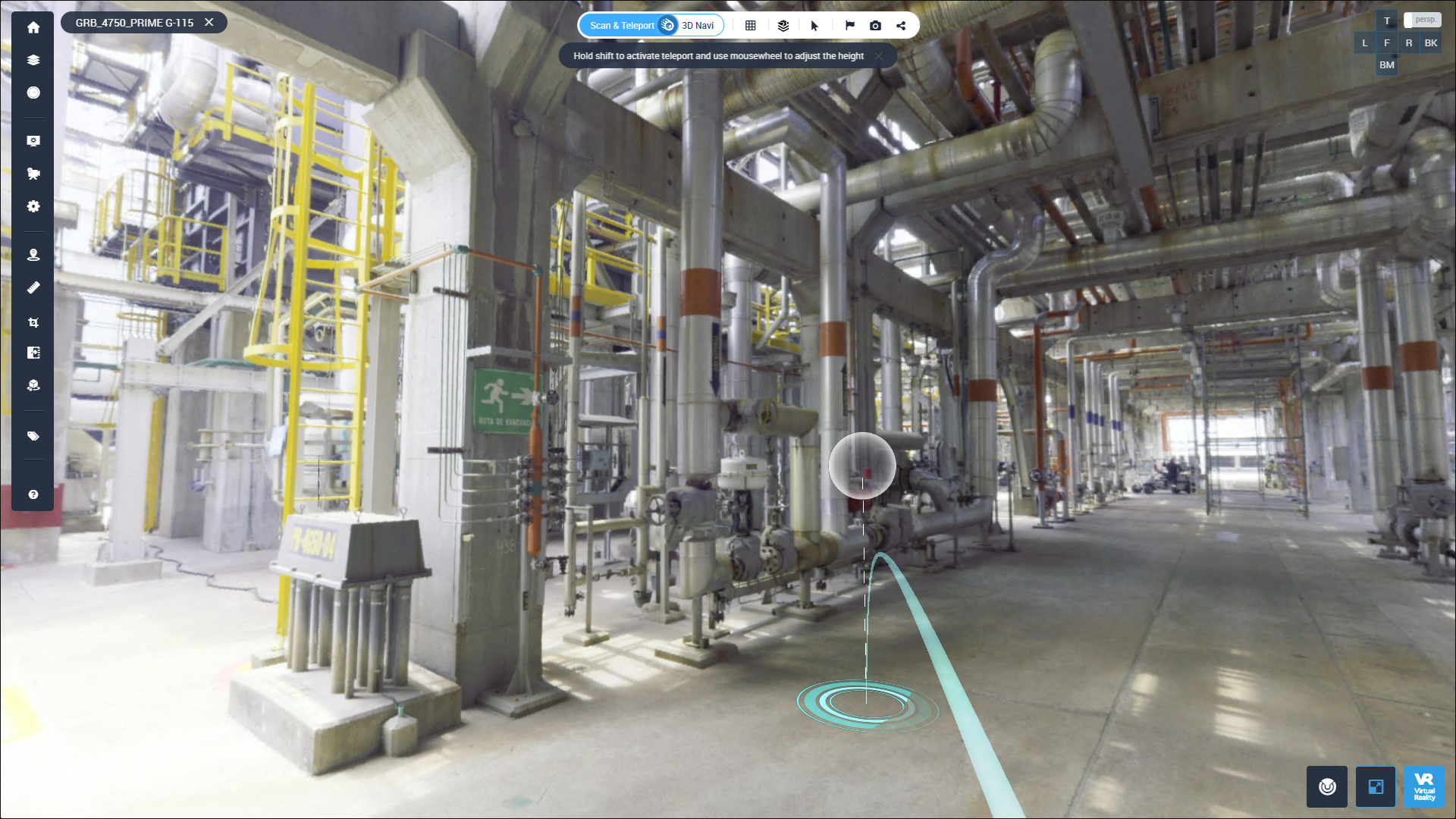
Collaboration and Access Controls
Industrial projects involve dozens of stakeholders - engineers, operators, planners, maintenance crews, and external contractors. Your platform should support unlimited user access with role-based permissions so that everyone sees what they need without compromising data security.
Browser-based collaboration eliminates the coordination headaches that come with sharing multi-gigabyte files. Teams can annotate, measure, and tag assets directly in the 3D environment instead of passing screenshots back and forth.
Enterprise System Integration
A platform only becomes a living reference when it connects with your existing enterprise systems. Evaluate whether the solution offers open SDKs and APIs that allow integration with BIM software, GIS platforms, CMMS, ERP, and IoT data feeds.
Cintoo includes open SDKs and APIs for connecting reality capture data into your existing tech stack. This creates a single source of truth where 3D scan data, operational metadata, and design models coexist.
How to Evaluate Platforms for CAD and BIM Data Integration
Start by mapping your current data sources. Most industrial facilities have accumulated scan data from multiple vendors, CAD models from different design phases, and BIM models at various levels of development. Your chosen platform must handle all of these without requiring format-specific workarounds.
Test the import process with your actual datasets. A platform that performs well with demo files may not cope with the dense, multi-billion-point scans your team captures in the field. Confirm that import and processing times remain acceptable at production scale.
Verify that the platform maintains spatial accuracy during conversion. Converting point clouds into more manageable data should not introduce geometric drift or reduce precision below your QA/QC tolerances. Survey-grade precision must be preserved end-to-end.
Evaluating Operational Data Centralization
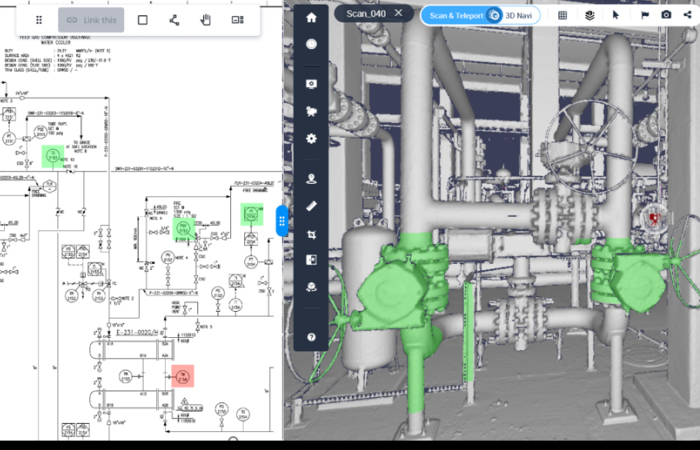
Beyond 3D geometry, your facility generates operational data: maintenance logs, IoT sensor readings, inspection records, and P&ID documentation. A strong asset visualization platform ties this information directly to spatial locations in your digital twin.
Cintoo's Twin Edition connects your interactive 3D environment with enterprise systems like ERP, MES, CMMS, and IoT to enrich your asset data with live, contextual insights. You can link systems of record directly to physical assets and facility areas in the scan data.
When evaluating centralization capabilities, ask: Can I attach custom metadata to individual assets? Can I import and align P&ID drawings against the 3D model? Can I track changes to my facility over time by comparing scans from different dates?
Browser-Based Access vs. Desktop-Only Solutions
Desktop-only solutions restrict who can view and interact with your 3D data. They require specific hardware, software licenses, and often lengthy installation procedures. This creates bottlenecks when field teams, remote engineers, or executive stakeholders need quick answers.
Browser-based platforms remove these barriers entirely. Your team opens a link, authenticates, and immediately starts navigating the facility in full resolution. No downloads, no plugins, no GPU requirements on the end-user device.
For industrial QA/QC, this accessibility translates to faster decision-making. A site manager can flag a deviation from a tablet on the factory floor, and the engineering team can review it from their office in minutes rather than days.
Scalability Factors for Large Industrial Deployments
Industrial environments evolve so your asset visualization platform needs to handle growing data volumes as you scan new areas, capture periodic updates, and onboard additional project teams.
Look for cloud-native architecture that scales storage and compute resources elastically. A platform that requires on-premises servers will eventually hit capacity limits, forcing expensive infrastructure upgrades.
Equally important is user scalability. An unlimited access model means you can onboard new team members, contractors, and stakeholders without per-seat licensing negotiations.
Security and Compliance Considerations
Industrial scan data often contains sensitive information about facility layouts, equipment configurations, and operational processes. Your platform must meet enterprise-grade security standards.
At a minimum, look for ISO 27001 and SOC 2 compliance, GDPR-compliant data handling, and robust access controls.
If your facility operates in regulated industries like oil and energy, pharmaceuticals, or defense, verify that the platform supports audit trails and data residency requirements specific to your jurisdiction.
 AI-Powered Classification and Its Role in Asset Management
Manual classification of assets across complex industrial environments is time-consuming. Tagging thousands of pipes, valves, and equipment items by hand in a 3D model can take weeks of dedicated effort.
AI-powered classification changes this equation. Cintoo's Click and Tag feature uses AI to reduce tagging time from over a minute per asset to just seconds by replacing manual 3D bounding box manipulation with real-time segmentation.
When evaluating AI capabilities, look for platforms that let you train or customize classification models for your specific asset types. A pharmaceutical plant has different tagging needs than an automotive factory, for example.
The Role of Issue Tracking in QA/QC Workflows
Finding a deviation is only the first step. Your platform must also support structured issue tracking so that flagged problems get assigned and resolved without falling through the cracks.
Look for integration with tools your team already uses, such as Procore or BIM Track. Cintoo supports issue tracking workflows that let you identify problems directly in the 3D environment and push them into your project management system for resolution.
Gilmore Construction used Cintoo's integration with Procore on an airport project to streamline QA/QC issue resolution, reducing the time between identifying a deviation and assigning corrective action.
Building a Scoring Framework for Platform Selection
Create a weighted evaluation matrix that reflects your team's priorities. Assign higher weights to capabilities that directly impact your primary use case, whether that is QA/QC, ongoing facility management, or digital twin development.
Suggested Evaluation Criteria and Weights
Consider these categories when building your scorecard:
- Data ingestion flexibility: Format support, scanner agnosticism, import speed at production scale
- 3D mesh quality and streaming: Precision preservation, browser performance, multi-resolution support
- QA/QC tooling: Scan-to-model comparison, deviation detection, issue tracking integration
- Collaboration features: User access model, role-based permissions, annotation and markup tools
- Enterprise integration: API availability, supported third-party systems, data exchange standards
- Security and compliance: Certifications, data residency options, audit trail capabilities
- AI and automation: Asset classification, automated tagging, workflow triggers
How to Run a Proof of Concept
Narrow your shortlist to two or three platforms, then run a structured proof of concept (POC) with your actual project data. Upload your densest scan datasets, import your BIM models, and test the specific workflows your team uses daily.
Involve end users from different departments: engineers, facility managers, and IT administrators. Their feedback on usability, performance, and integration will reveal issues that a vendor demo never surfaces.
Set clear success criteria before the POC begins. Define acceptable load times, accuracy thresholds, and integration test scenarios so that decision-making is based on results rather than opinions.
Comparing Platform Architectures: Cloud-Native vs. Hybrid
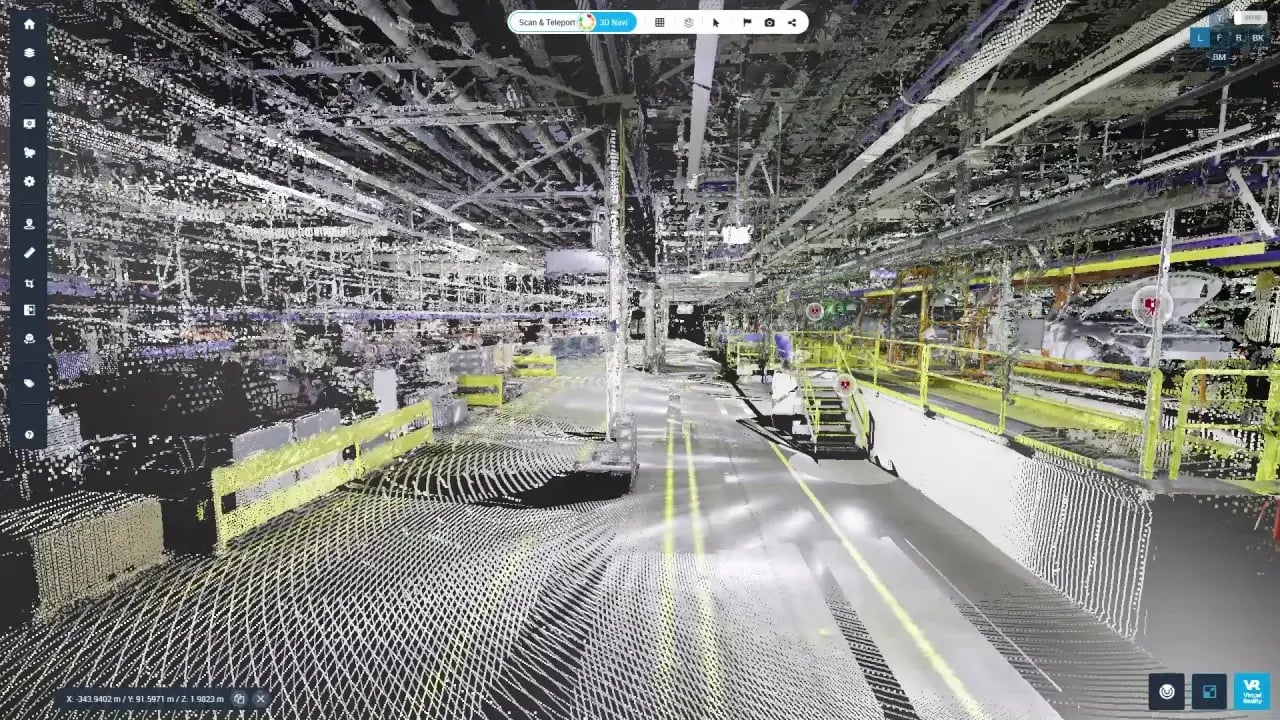
Cloud-native platforms store and process all data in the cloud, giving you access from any location with an internet connection. This architecture eliminates local infrastructure costs and simplifies IT management.
Hybrid architectures store some data locally while syncing with cloud services. This may appeal to organizations with strict data residency requirements, but introduces complexity in synchronization, version control, and access management.
For most industrial teams, cloud-native delivery offers the faster path to value. It removes procurement delays for hardware, reduces maintenance overhead, and scales instantly as your scanning program grows.
Avoiding Vendor Lock-In Through Open Standards
Lock-in happens when your platform only supports one vendor's scanner hardware or exports data in proprietary formats. This limits your future options and creates dependency on a single supplier's roadmap.
Evaluate whether a platform supports open data exchange standards like IFC, E57, and LAS. Confirm that you can export your processed data in standard formats if you ever need to migrate or integrate with another system.
Cintoo's hardware-agnostic approach means you can capture data with any device and centralize it on one platform. Open APIs and SDKs further ensure that your data remains accessible and portable.
Common Pitfalls When Choosing an Asset Visualization Platform
One frequent mistake is evaluating platforms using demo datasets that are far smaller and less complex than your real-world data. Always test with production-scale scans to understand actual performance.
Another pitfall is overlooking total cost of access. A platform with per-seat licensing may look affordable for a small pilot team, but costs can escalate quickly when you need to give 50 or 100 stakeholders access to the same 3D environment.
Finally, be cautious of platforms that force you into a single scanner ecosystem. Vendor-agnostic support ensures you can capture data with any device and still centralize it in one place.
Choosing the Right Platform for Industrial QA/QC and As-Built Verification
The right asset visualization platform turns your 3D scan data into a strategic asset. By centralizing CAD, BIM, and operational data in one browser-accessible environment, you give every stakeholder the clarity they need to make confident decisions.
Focus your evaluation on data quality, browser-based accessibility, QA/QC tooling, and open integrations. Run proof-of-concept tests with real data, involve your end users, and score platforms against weighted criteria that match your priorities.
Cintoo gives you a cloud-native platform built for exactly this challenge: high-fidelity mesh streaming, unlimited user access, and enterprise-grade security.
Explore Cintoo to see how it fits your asset visualization strategy. Test it with your own scans and models by requesting a free demo.



.png?width=48&height=48&name=sensors%20(1).png)
.png?width=65&height=50&name=sensors%20(2).png)


.png?width=69&height=50&name=cloud_done%20(1).png)


.png?width=42&height=49&name=Group%2015496%20(2).png)


.png?width=60&height=60&name=calendar%20(1).png)


.png?width=48&height=45&name=image%20175%20(1).png)