A Practical Guide to the 360 Edition
Reality capture methods are increasingly embracing multimodality, harnessing the ability to utilize different capture methods that match different job site requirements. For years, laser scanning and BIM models have been the foundation of accurate 3D understanding—but they aren’t always the fastest or most practical way to capture reality at scale. With the introduction of Cintoo’s 360 Edition, organizations can now combine the speed and simplicity of 360 video with the power of true 3D workflows.
This guide answers the most common questions customers ask about 360 + 3D, how it works inside Cintoo, and why it matters for real‑world projects.
Time to Value: Why 360 + 3D Delivers Faster ROI
One of the biggest advantages of the 360 Edition is how quickly teams can realize value in shifting to some 360 capture workflows. Instead of waiting weeks for scan scheduling, processing, and delivery, users can capture 360 video in minutes using a lightweight camera and see it inside Cintoo shortly after upload, given the end-to-end, capture-to-cloud process. For those areas or spaces that don't require the full extent of laser scanning, 360 capture offers an intuitive, low cost and easy-to-use option for visualization.
This faster turnaround translates directly into ROI:
-
Lower capture costs compared to repeated laser scanning
-
Faster site understanding and fewer site visits
-
Broader coverage across large or multi‑site assets
-
Immediate access to measurements, annotations, and other 3D-based tools in Cintoo
Most importantly, teams don’t need to change platforms or workflows. The 360 Edition plugs directly into existing projects.
How Does It Work End‑to‑End?
The 360 Edition delivers a complete capture‑to‑consumption workflow:
-
Capture: Users record 360 videos in the field using a certified Ricoh THETA X camera. The camera is lightweight, easy to use, and requires minimal training.
-
Upload: Once connected to Wi‑Fi, 360 videos are automatically uploaded to Ricoh360 and made available for import into Cintoo.
-
Import & Process: Videos are imported into a Cintoo project, where the system automatically processes camera paths and prepares the data for alignment.
-
Align: Using a dedicated 360 alignment tool, users align the 360 data to existing laser scans or BIM models, placing it accurately in 3D space.
-
Visualize & Use: The aligned 360 data can now be navigated, measured, annotated, tagged and shared—just like any other data inside Cintoo.
Why Combine 360 and 3D?
360 video is fast and accessible, but on its own it lacks spatial precision. 3D scans are accurate, but costly and time‑intensive to capture everywhere.
By combining the two, Cintoo enables:
-
Faster visual context without sacrificing spatial understanding.
-
A single source of truth instead of split‑screen workflows.
-
Better communication across technical and non‑technical teams.
- Complementary options for Scan & BIM, Scan vs BIM or digital twin and asset management workflows.
Cintoo is uniquely positioned here: it’s the only platform that brings Ricoh‑native 360 datasets, 3D scans, and BIM or CAD together inside the same 3D space.
What Is Gaussian Splatting and Why Does It Matter?
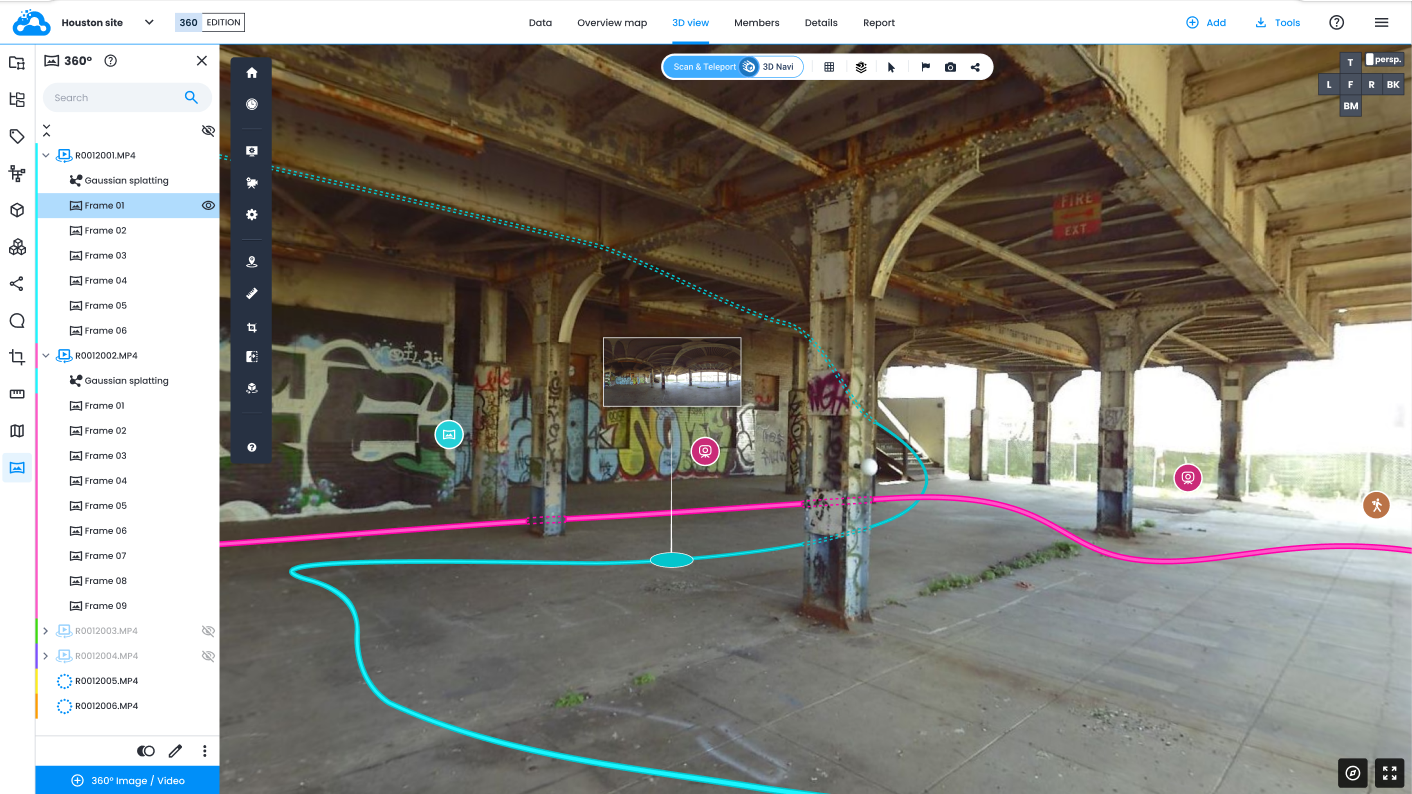
Gaussian Splatting is the visualization technology that powers high‑quality 3D rendering of photogrammetry-based 360 data inside Cintoo.
The 360 Edition converts 360 video walks into camera paths and point‑based data that can be displayed using Gaussian Splats, producing smooth, realistic 3D visuals without heavy datasets. This results in:
The outcome is high‑fidelity visualization from lightweight capture, ideal for large‑scale environments.
Gaussian Splatting complements Cintoo’s acclaimed high-resolution 3D mesh streaming technology, powered by TurboMesh for 3D laser scan data. Both 3D meshes and Gaussian Splats can be rendered at the same time in Cintoo’s 3D viewer.
.jpg?width=3819&height=2037&name=Cintoo%20360%20Screenshot%205%20(1).jpg)
How Wil This Complement My Existing Reality Capture Methods?
360 capture shouldn't be a replacement for laser scanning. Instead, it expands what’s possible.
Laser scans remain essential for areas requiring high precision and complete geometry. But many use cases don’t require full scan coverage.
With the 360 Edition, teams can:
-
Use laser scanning selectively where accuracy is critical
-
Use 360 capture to fill gaps quickly and cost‑effectively
-
Manage all data together in one multimodal platform
This is especially powerful for Industry 4.0 sites, where assets are large, complex, and distributed across many locations.
Do I Need to Be an Expert to Use the 360 Edition?
No. The 360 Edition democratizes reality capture.
Anyone can capture 360 video using a lightweight camera - no scanning expertise required. More experienced users can handle alignment and project setup, while engineers, inspectors, and technicians simply consume the data inside Cintoo using familiar tools.
This flexibility supports multiple personas without forcing everyone to become a reality capture specialist.
What Capabilities Are Included?
There are no functional limitations when using the 360 Edition.
Once aligned, 360 data behaves like any other data in Cintoo. Users have access to:
-
Navigation inside a unified 3D environment
-
3D Annotations and comments
-
3D measurements
- 3D tags and links to P&IDs
-
Comparisons with laser scans or models
-
Secure sharing and access controls
.jpg?width=3833&height=2042&name=Cintoo%20360%20Screenshot%201%201%20(1).jpg)
What Are Some Use Cases?
The 360 Edition is designed primarily for:
Start Anywhere with 360 Inside 3D
The key idea behind the 360 Edition is simple:
You don’t need a scanner to start building spatial context.
With Cintoo’s 360 Edition, teams can start anywhere. They can capture what matters, where it matters and grow into more advanced reality capture workflows over time.
360 data becomes navigable, measurable, and actionable, fully integrated into 3D.
That’s the new standard for 360 + 3D workflows.



.png?width=48&height=48&name=sensors%20(1).png)
.png?width=65&height=50&name=sensors%20(2).png)


.png?width=69&height=50&name=cloud_done%20(1).png)


.png?width=42&height=49&name=Group%2015496%20(2).png)


.png?width=60&height=60&name=calendar%20(1).png)


.png?width=48&height=45&name=image%20175%20(1).png)

-1.jpg)