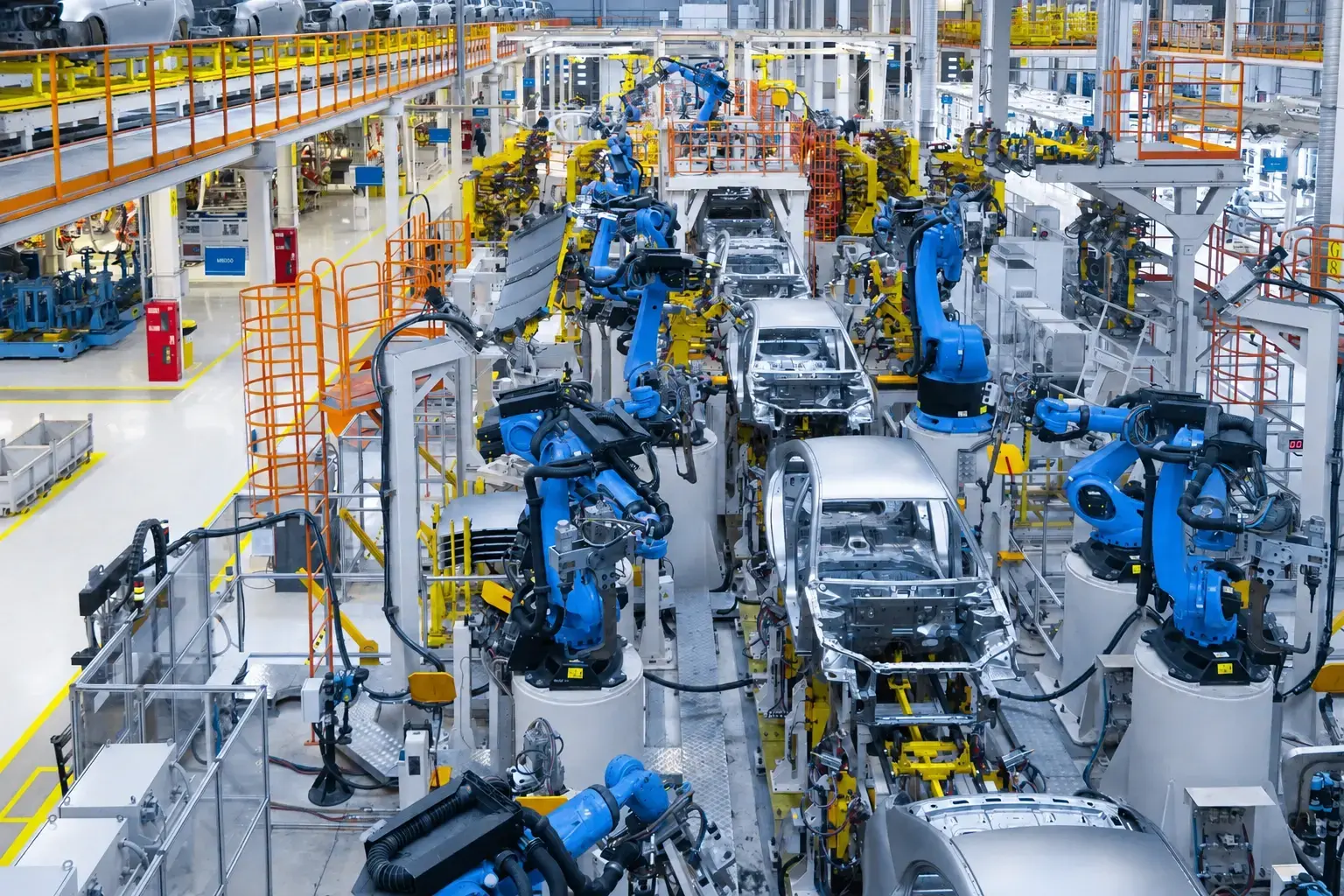
An automotive plant changes every time a new model comes in. New tooling, a reworked line, a robot cell where a conveyor used to be. Launch dates don't move, so the people planning that work need to know exactly what's on the floor today, not in three months.
Laser scans capture that reality down to the millimeter. What happens next decides how fast you can act. The traditional route, scan-to-BIM, turns the point cloud into a model by hand. On a full plant, that takes weeks or months, and it means copying huge, sensitive datasets onto local workstations along the way.
Scan-to-mesh takes a different route. It turns the point cloud into a high-resolution 3D mesh in hours: a continuous, measurable surface that looks like the real plant, keeps every detail, and stays in one secure cloud environment. Everyone who needs it opens it in a browser. If you already have BIM models, you place them on top and see straight away where the design and the floor disagree.
This guide compares automotive facility teams use to view and share their scan data. Most of them are point cloud viewers; only one is built around scan-to-mesh. We judged them on speed, accuracy, scalability, data control and model overlay. Full disclosure: Cintoo is our product, and we've included its limitations alongside everyone else's.
Key Takeaways
- Scan-to-mesh gives you usable 3D plant data in hours. Scan-to-BIM takes weeks or months for the same hall.
- A mesh is as accurate as your scanner, down to the millimeter. A BIM model is a modeler's interpretation of the scan.
- Keeping scan data in one controlled cloud environment, instead of on local workstations, matters in an industry as security-sensitive as automotive.
- Most competing platforms are point cloud viewers. Meshes are 10 to 20 times lighter, so they scale to more projects and more users far more easily.
- Already running scan-to-BIM? Cintoo brings your finished BIM models into the same browser view as the mesh, and uses the mesh to QA/QC them against reality.
What do automotive facility teams need from 3D scan data?
Automotive teams need accurate plant data fast, kept under tight control, and open to everyone who has to act on it. In practice, that comes down to five things.
Speed. Model changeovers and line retrofits run to fixed launch dates. Teams can't wait months for a model of the existing floor before they start planning.
Every detail, at millimeter accuracy. A cable tray, a sprinkler head, a bolt on a robot base: if it's on the floor, it has to be in the data. A new conveyor that misses a column by 2 cm is still a clash.
Control over sensitive data. Plant layouts, line configurations and prototype areas are confidential. Every copy of a scan on a contractor's laptop is a copy you no longer control.
Scale. A body shop or assembly hall scan can run to hundreds of gigabytes, and a manufacturer may have dozens of sites. The platform has to handle all of it without asking you to thin out the data you paid to capture.
One view for everyone. Production engineers, facility planners, maintenance, contractors and headquarters all need to look at the same reality, and check new designs against it.
Scan-to-mesh vs. scan-to-BIM: why it matters for automotive plants
Scan-to-BIM turns a point cloud into a simplified model, built object by object by a modeler. Scan-to-mesh turns the same point cloud into a continuous 3D surface that reproduces the plant exactly as scanned. For automotive teams under time and security pressure, scan-to-mesh has five clear advantages.
Hours, not weeks or months. A mesh is ready within hours of the scan being uploaded. A scan-to-BIM model of a full hall takes weeks or months of modeling before anyone can use it.
Reality, not interpretation. A mesh is as accurate as the scanner that captured it, down to the millimeter. A BIM model is a modeler's reading of the scan: simplified, and only as good as the choices made while building it.
Sensitive data stays under control. Scan-to-BIM means copying full point clouds onto local workstations, often at several contractors, and losing track of where your plant data lives. With scan-to-mesh in the cloud, the data stays in one controlled environment and people view it rather than download it.
Instantly scalable. Adding a project or a user to mesh data is as quick as adding a scan. There's no new model to build and no new hardware to buy for each person who needs access.
A check on your BIM data. Because the mesh is a faithful record of reality, you can use it to QA/QC BIM models, whether built in-house or delivered by a contractor, and catch errors before they reach the production floor.
Scan-to-mesh doesn't replace BIM where you need it. If your workflow still relies on scan-to-BIM, the finished models sit on top of the mesh, so teams get the design intent and the real conditions in one view.
Quick guide: 6 best scan viewing platforms for automotive facilities
Only one platform on this list is built around scan-to-mesh. FARO Sphere XG has some mesh capability; the others are point cloud or panorama viewers.
- Cintoo: the scan-to-mesh platform, turning automotive plant scans into accurate 3D meshes that stream and scale in any browser.
- FARO Sphere XG: a cloud point cloud viewer with some mesh capability, best for teams using FARO scanners across several sites.
- NavVis IVION: a browser platform for walking through a plant in panoramic images, best with NavVis scanners.
- Autodesk ReCap Pro: a desktop point cloud tool for teams already working in Revit and Navisworks.
- Trimble RealWorks + Connect: a desktop point cloud toolset for survey teams, with cloud sharing in a separate product.
- Matterport: a capture-to-tour platform for visual walk-throughs of smaller spaces.
How to Choose the Best Platform for Automotive Facilities
We judged each platform on what matters most to automotive teams working against launch dates and strict confidentiality rules.
Time to usable data: How long between uploading a scan and the whole team being able to work with it? Hours, or weeks?
Accuracy and detail: Do you see the plant at the scanner's full, millimeter-level accuracy, with every visible detail readable? Or do you get a sparse point cloud or a simplified model?
Scalability: Load a full-plant dataset, then add ten more projects and fifty more users. Point cloud viewers tend to slow down or demand more hardware and bandwidth as data grows. A lightweight mesh doesn't.
Data control: Does the data stay in one secure environment where people view it, or does it get copied onto local machines to be used?
Model overlay: Can you put your BIM or CAD models over the real plant, spot where they disagree, and QA/QC them against reality?
Hardware flexibility and integrations: Most plants have scans from several scanner brands. Check that the platform accepts them all and connects to the tools your team already uses, such as Revit, Autodesk Construction Cloud, Procore or ArcGIS.
The 6 best scan viewing platforms for automotive facilities
1. Cintoo: the scan-to-mesh platform for automotive facilities
Cintoo is built around one idea: turn heavy point clouds into accurate meshes that anyone can use, fast. Its TurboMesh™ engine converts scans into high-resolution 3D meshes 10 to 20 times smaller than the source files, without losing accuracy. The mesh is ready in hours, and anyone with a web browser can stream the full plant.
The mesh reproduces the plant as the scanner captured it, down to the millimeter. You see solid surfaces instead of scattered points, so every bracket, valve and cable run is easy to read and measure. There's no modeler's interpretation in between.
That matters for security too. Scan data stays in Cintoo's cloud environment, where people view and measure it in the browser rather than downloading point clouds to their own machines. For automotive teams protecting confidential line layouts and prototype areas, that means fewer uncontrolled copies.
Because meshes are so light, Cintoo scales the way a plant portfolio does. Adding a new site, project or user is as quick as adding a scan, with no new hardware and no seat limit.
If your team still runs scan-to-BIM, Cintoo brings your finished BIM and CAD models into the same web app, on top of the mesh. Planners see the design and the real conditions together, and BIM managers use the mesh to QA/QC models against reality
QA/QC models against reality
before installation. Cintoo doesn't author models itself: your modelers keep their usual tools.
Cintoo features
- TurboMesh™ engine: point clouds become meshes 10 to 20 times smaller, ready in hours, so a full assembly hall streams in a browser.
- Model vs. reality comparison: overlay your BIM or CAD model on the mesh and spot a misaligned duct before it holds up a line installation.
- QA/QC of BIM models: check models built in-house or by contractors against the mesh of what's actually there.
- AI-powered asset classification: automatically identify and categorize equipment across complex plant environments [TO VERIFY: time saved per asset].
- Unlimited users, web access: anyone who needs the data gets a link, with nothing to install and no license to request.
- Any scanner: bring in data from terrestrial, mobile or drone scanners, whatever brand each contractor used.
- Integrations: connects to Autodesk Construction Cloud, BIM 360, Revit, Procore and Esri ArcGIS.
- Enterprise-grade security: SOC 2 Type 2 and ISO 27001 certified, hosted on Microsoft Azure and Amazon Web Services.
Cintoo pros and cons
Pros:
Cons:
- Cintoo doesn't author BIM models. You'll still need Revit or a similar tool to create them.
- If your team is new to reality data in the cloud, set aside time to agree on who uploads, who reviews and how projects are organized.
.webp?width=524&height=310&name=automotive%20(2).webp)
2. FARO Sphere XG: a point cloud viewer with some mesh capability
FARO Sphere XG brings point clouds and 360° photos together in one cloud environment. It handles data from FARO's stationary and mobile scanners, plus iPhone LiDAR and 360° cameras. For teams running FARO hardware across several plants, it gives a central place to view, measure and annotate scans.
It offers some mesh capability, but its core experience is still a point cloud viewer. That's the main difference with Cintoo: point clouds are heavier to stream and store, so scaling to full-plant datasets, many sites and many users is harder.
FARO Sphere XG pros and cons
Pros:
- If your sites already run FARO scanners, getting their data into one shared place is straightforward.
- Comparing scans across dates makes it easy to show what's changed on the floor.
Cons:
- It works best with FARO's own formats. Data from other scanners can need extra steps.
- Primarily point cloud based, so very large plant datasets are heavier to stream and scale.
3. NavVis IVION: a panoramic viewer for plant navigation
NavVis IVION puts a scanned facility online as a walkable space. You click through high-resolution panoramas, much like Street View for your plant, with point cloud data behind every image. A planner at headquarters can look around the body shop without booking a flight.
It isn't a scan-to-mesh product. What you work with is panoramic imagery backed by point clouds, which suits visual checks better than detailed measurement from any angle.
NavVis IVION pros and cons
Pros:
- People who've never opened a point cloud find their way around immediately.
- Viewing happens in the browser, with nothing to install.
Cons:
- You get the most out of it with NavVis scanners.
- Point cloud and panorama data are heavier to scale across a large plant portfolio than a lightweight mesh.
4. Autodesk ReCap Pro: a desktop point cloud tool for Revit-centric teams
Autodesk ReCap Pro prepares scan data for use in Revit and Navisworks. If your facility team already lives in the Autodesk ecosystem, it keeps point clouds moving through a familiar pipeline.
It isn't really a scan-to-mesh product. ReCap can export meshes [TO VERIFY: ReCap 2026 mesh capability], but it remains a desktop point cloud tool built to feed scan-to-BIM.
Autodesk ReCap Pro pros and cons
Pros:
- It's the tool most Revit modelers already know.
- Strong links to Revit and Navisworks.
Cons:
- Viewing is desktop-based, so point clouds have to sit on local machines.
- Licenses are per user, so access usually stays with the modeling team.
5. Trimble RealWorks + Connect: a desktop point cloud toolset for survey teams
Trimble RealWorks is desktop software for survey specialists, with tools such as inspection reports and floor flatness analysis. That last one is useful in a plant, where a new press or robot cell needs a level slab. Trimble Connect sits alongside it to share project files with the wider team.
It isn't really a scan-to-mesh product either: RealWorks is built around point clouds on the desktop, and sharing happens in a separate tool.
Trimble pros and cons
Pros:
- Floor flatness checks are useful before installing heavy equipment.
- Connect gives stakeholders access to project files without a RealWorks license.
Cons:
- Working with scans in detail means installing RealWorks and storing point clouds locally.
- Teams switch between two products to analyze and share.
6. Matterport: a capture-to-tour platform for walk-through documentation
Matterport creates immersive 3D virtual tours that stakeholders can walk through remotely. For smaller jobs such as a fit-out or a maintenance area, it's a quick path from capture to a shareable visual record.
Its mesh is built for virtual tours, not engineering-grade scan-to-mesh. Measurements are accurate to about 1% [TO VERIFY against Matterport's current specs], around 10 cm over 10 meters: fine for a fit-out, too loose for aligning a new production line.
Matterport pros and cons
Pros:
- About as easy as reality data gets: managers and clients find their way around without training.
- You can start with a smartphone or a third-party LiDAR device.
Cons:
- Not designed for millimeter-accurate engineering checks.
- Full-plant industrial datasets aren't what it's built for.
Why Cintoo is the best scan-to-mesh platform for automotive facilities
Automotive teams work against fixed launch dates and strict confidentiality rules. Cintoo is built for both. TurboMesh™ turns terabyte-scale point clouds into accurate, high-resolution meshes in hours, and the data stays in one secure cloud environment where people view it instead of copying it.
Where other platforms keep you in point clouds that get heavier with every site and every user, Cintoo's lightweight meshes scale as fast as you add scans. And if your workflow still relies on scan-to-BIM, your finished models sit on top of the mesh, so teams see the design and the real plant in one view and QA/QC every model against reality.
Your modelers keep their tools. Everyone else finally sees the plant as it really is, when they need it.
FAQs about scan-to-BIM software for automotive facilities
What is scan-to-BIM software?
Scan-to-BIM software converts 3D laser scan data (point clouds) of an existing site into a Building Information Model. The model contains parametric objects such as walls, pipes and structural members, which teams use for design, coordination and documentation. Some platforms, including Cintoo, also turn scans into streamable meshes that modelers use as a reference in Revit.
Why do automotive facilities need scan-to-BIM workflows?
Automotive plants change constantly: a new model means new tooling, upgraded equipment or a reworked line. Original drawings rarely reflect what’s actually on the floor after years of changes. Scan-to-BIM gives your team an accurate record of current conditions, so a new robot cell or conveyor is planned against reality rather than an outdated drawing.
Can scan-to-BIM software work with scans from different hardware brands?
It depends on the platform. Some accept data from any manufacturer, while others are optimized for their own hardware and handle other formats less well. If your sites use more than one scanner brand, test each platform with real files from each device before you buy. Cintoo accepts data from any terrestrial, mobile or drone scanner.
How does scan-to-mesh support BIM workflows in manufacturing?
Scan-to-mesh conversion produces lightweight 3D surfaces that preserve the accuracy of the original point cloud. These meshes load faster and are accessible to broader teams than raw point cloud files. Cintoo's TurboMesh™ engine compresses datasets by 10 to 20x, giving modelers and planners immediate access to high-fidelity facility data before formal BIM authoring begins.
What integrations should I look for in a scan-to-BIM platform?
At a minimum, look for a direct connection to your BIM authoring tool (usually Revit). Then add your coordination tool (such as Navisworks), project management tool (such as Procore) and GIS (such as ArcGIS). Check whether each connection is native or relies on file exports.



.png?width=48&height=48&name=sensors%20(1).png)
.png?width=65&height=50&name=sensors%20(2).png)


.png?width=69&height=50&name=cloud_done%20(1).png)


.png?width=42&height=49&name=Group%2015496%20(2).png)


.png?width=60&height=60&name=calendar%20(1).png)


.png?width=48&height=45&name=image%20175%20(1).png)