
WORKSPACE

Bring your whole team into your reality data

Collaborate inside high-fidelity digital twins in real-time with Cintoo workspace

cintoo

Step inside your scan data together

Tired of reviewing your reality data with your team over screenshots and screen shares? Wish everyone could step inside your scans and models and explore them together?

Cintoo Workspace enables you to collaborate in real time inside high-fidelity digital twins – at a desktop, in a VR headset, or in an immersive room. 

It’s simple to connect your reality capture data, invite colleagues, navigate the project together, and inspect, measure, annotate, and capture issues, all in the same shared environment.

Cintoo Workspace
Cintoo Workspace
head_mounted_device

How teams make better decisions using Cintoo Workspace

Teams across the asset lifecycle are using Cintoo Workspace to build a shared understanding, speed up reviews, cut site visits and make faster, more confident decisions.

Design: Coordinate new work against existing conditions and catch conflicts before you're on site. Engineering: Bring remote specialists together to inspect, measure and resolve issues in context. Operations: Monitor assets, plan changes and onboard teams without repeat site visits. Maintenance: Plan and train crews in the space so they arrive knowing what to expect.

Cintoo Workspace-Igloo
cintoo

What's Happening

Catch up on our latest webinar, now available to watch anytime. See how simple it is to connect to your reality capture data, invite your colleagues, navigate the space, and inspect and log issues. 

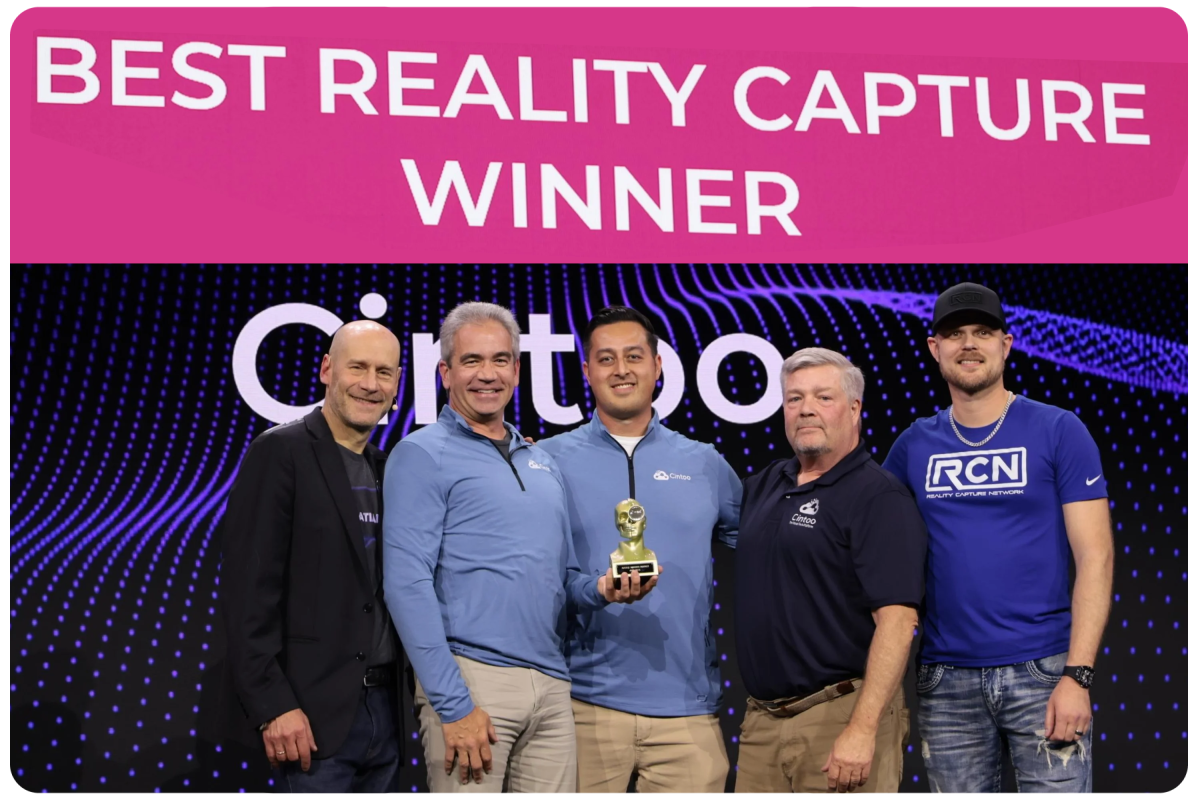
We've already earned industry recognition for our high-fidelity streaming technology and immersive collaboration workflows, winning an AWE Auggie Award win for Best Reality Capture Solution. Industry publications including Auganix and The XR Beat, have also spotlighted how Cintoo Workspace is bringing teams together inside their reality data.

Cintoo Workspace Award Winners

Our Partners

Trusted by teams who build together

See how infrastructure and engineering teams use Cintoo Workspace to align stakeholders around a single model. 

"Cintoo has truly been a game changer for our team. Bringing our reality capture and design data together in one collaborative environment has transformed how we work, both internally and with external partners. We can’t wait to see how Workspace takes that experience to the next level!"

Russ Lowry

CAD Manager, Bi-Con Engineering

 “Cintoo Workspace creates a shared reality where every stakeholder can come together around a single model, see the project through the same lens, and solve issues collaboratively. By replacing siloed reviews with one unified perspective, it reduces duplicate markups and repeated issue resolution-while opening the door for stakeholders outside the traditional review process to experience and contribute to the proposed project.” 

John Niles

Sr. Program Manager, Infrastructure & Capital Projects (I&CP), Accenture

"Cintoo has transformed how we deliver reality capture data to anyone, anywhere, and bringing that data into VR is a natural evolution. Cintoo Workspace is shaping up to be a solid platform with significant potential ahead, backed by a responsive team that listens to user feedback and executes."

Byron Saxon

Director, Digital Delivery, Jedson Engineering

Use our Streaming SDK

Discover Cintoo Workspace Today!

Cintoo Workspace is designed for organizations looking to move beyond static visualization and toward true collaborative reality capture workflows.

Leave your contact details and we'll get in touch soon.

FAQ

What does Cintoo Workspace cost to use?

chevron_down

Cintoo Workspace is free for a single user, and free for anyone invited to participate in real-time collaborative meetings. All you need to do is download the app (which you'll receive after completing the form on this page) and refer to the Quick Start guide to get started.

To host real-time, collaborative meetings using Cintoo Workspace, there is an additional subscription fee. Contact sales for more information.

Additionally, the Cintoo Streaming SDK and plugins for Unreal and Unity are freely available for your custom development needs.


What kind of display devices does Cintoo Workspace support?

chevron_down

Cintoo Workspace is a desktop app that runs on most modern desktop and laptop computers.

Further, as a PCVR app, Cintoo Workspace supports tethered displays, including:

  • Meta Quest headsets
  • HTC Vive headsets
  • Pico headsets
  • other SteamVR-compatible devices.

Additionally, we support Igloo immersive rooms. Contact sales for more information about using Cintoo Workspace on an Igloo device.

What kind of hardware do I need to run Cintoo Workspace?

chevron_down

We recommend you use a PC with:

  • High-Performance (GPU): Nvidia RTX 4090 laptop or better (16go min)

  • Processor (CPU): Intel Core i9

  • Memory (RAM): 32go

At a minimum, you must use a PC with:

  • High-Performance (GPU): Nvidia RTX 4070 laptop or better

  • Processor (CPU): Intel Core i7

  • Memory (RAM): 16go

Optional VR hardware: 

  • Quest 3 or Pico headset

  • USB sync cable

  • Igloo Vision immersive room

For more details, please see Cintoo Workspace Specs & Performance.

What practical data limitations do you recommend for a smooth immersive experience?

chevron_down
  • File size: no limit
  • Scans: 10,000
  • Tag limits: 1000
  • Triangle/polygon count: 1,000,000,000
  • Model elements: 50,000
  • Geographic range/limit: no limit

Does Cintoo Workspace support offline usage?

chevron_down

No, currently Cintoo Workspace can only be used while online, and connected to your Cintoo account.  

Does Cintoo Workspace support clash detection?

chevron_down

Cintoo is developing tools to support the import and manipulation of asset tags in Workspace, as well as in-app analysis tools like clash detection for assets and their clearance volumes. Stay tuned for updates as development progresses.